Ink Tank Printer vs Inkjet: Which Costs Less to Run? (October 2026)
For ink tank printer vs inkjet, choose tanks for regular printing and cartridges for light use or useful office features. Compare the printer, replacement ink, and any subscription over your expected ownership period to find which costs less.
On this page (10 sections)
- Ink tank printer vs inkjet: which costs less to run?
- How much printing makes an ink tank worthwhile?
- Which of these 3 printers fits your work?
- How do you compare total ownership cost?
- Should you use an ink subscription?
- What should you do during setup?
- How do you care for tanks and cartridges?
- Does color printing change the choice?
- Which buying mistakes should you avoid?
- Ink tank printer vs inkjet: make the final choice
An ink tank printer usually makes more sense for regular printing, while a cartridge inkjet can suit lighter use or a home office that needs better paper handling. The ink tank printer vs inkjet decision comes down to your page count, ink costs, and daily tasks.
Both types use inkjet technology. The difference is how they hold ink: refillable tanks take bottled ink, while cartridge models use replaceable cartridges.
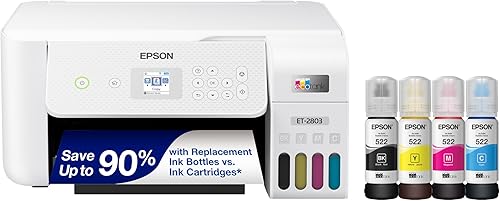
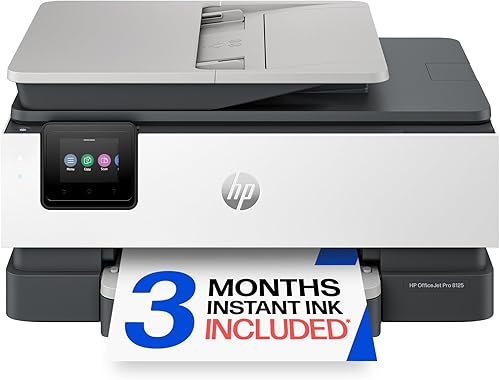
For these 3 choices, the Epson EcoTank ET-2803 targets regular household printing, the HP OfficeJet Pro 8125 adds office tools, and the HP DeskJet 2955 covers basic jobs.
Ink tank printer vs inkjet: which costs less to run?
Tanks often have lower ink cost per page, but the lowest running cost doesn't always mean the lowest total cost. A printer must produce enough pages during your ownership to make any extra upfront expense worthwhile.
Epson rates the ET-2803's replacement ink set for up to 4,500 black pages and 7,500 color pages. These are yield estimates, not a promise that every mix of documents will reach those counts.
Dense graphics, photos, and cleaning cycles can change how far ink goes. Don't add the black and color figures together as though they represent one guaranteed total.
For a rough ink comparison, divide replacement supply cost by its stated yield. Use comparable black-document and color-document figures rather than comparing a black cartridge with a full color bottle set.
The HP models need a separate calculation using their replacement cartridges. Their included setup cartridges aren't a sound substitute for replacement supply yields.
A low-volume household might never use enough ink to recover a larger upfront difference. A household printing schoolwork and color documents every week has more reason to examine bottle-based running costs closely.
How much printing makes an ink tank worthwhile?
Regular use matters more than a single page-count cutoff. Estimate your normal month and your busiest month before choosing a printer.
Count printed sides, not just sheets: a document printed on both sides of 10 sheets contains 20 printed pages. Include copies, school projects, forms, and work documents.
Separate mostly black pages from color pages. A few short letters and a stack of full-page color worksheets place very different demands on the ink supply.
Ink tank vs cartridge inkjet for regular use
Choose a tank model when you expect steady printing and want fewer supply changes. Epson says the ET-2803 includes up to 2 years of ink based on roughly 125 pages per month.
That estimate gives you a useful workload reference, rather than a minimum use requirement. A busier household will work through its supply sooner.
Start with our best ink tank printers guide if that routine matches yours. The complete ink tank printer guide explains the format and the features to compare.
Cartridge inkjets for light use
A cartridge printer can be enough for short household jobs, especially when you don't need a large ink reserve. Choose based on the functions you need rather than paying for capacity you may leave unused.
Long idle periods need separate thought because both systems use liquid ink. Our guide to whether ink tank printers are worth it helps weigh the ink supply against your likely use.
Which of these 3 printers fits your work?
Choose the Epson for refillable ink, the OfficeJet for paperwork, and the DeskJet for short household jobs. All 3 print, scan, and copy, but their document handling differs.
Wireless printing doesn't tell you whether a printer will suit a long report or a stack of scans. Match those tasks before comparing ink systems.
Epson EcoTank ET-2803: regular household printing
The ET-2803 fits families and students who print throughout the week and prefer bottle refills. Its flatbed scanner suits individual forms, receipts, and pages that you can place on the glass.
AirPrint and Epson Smart Panel support phone and tablet printing. A color display provides controls at the printer.
Skip this model if automatic two-sided output is central to your routine. Its simplex printing leaves you to turn and reload paper for two-sided jobs.
Also look beyond it if you routinely scan stacks of paperwork. A flatbed works page by page, which adds handling time as document length grows.
HP OfficeJet Pro 8125: document-heavy home offices
The OfficeJet Pro 8125 fits people who regularly print reports and scan multi-page documents. Its automatic document feeder, automatic duplex printing, and 225-sheet input tray reduce repeated paper handling.
HP rates printing at up to 20 pages per minute in black and 10 in color. Those figures help set expectations for batches, although real job time also includes processing and paper handling.
Don't assume an automatic document feeder means automatic two-sided scanning. Confirm that separate capability if you need to digitize both sides of documents without turning them.
Skip this model if you won't use its office features or want unrestricted cartridge choices. It blocks cartridges with non-HP chips or circuitry, and firmware updates maintain those restrictions.
HP DeskJet 2955: basic household documents
The DeskJet 2955 fits recipes, letters, forms, and occasional copies. Its 60-sheet tray is suited to short jobs rather than long unattended batches.
Two-sided printing is manual, with driver support. You follow the reload prompts rather than having the printer turn each sheet automatically.
Skip it for frequent long reports or large copy jobs. Its up-to-7.5-page-per-minute black speed and 5.5-page-per-minute color speed favor lighter work.
This model uses separate black and tri-color cartridges. Since the color cartridge combines cyan, magenta, and yellow, heavy use of one color can leave the others partly unused when replacement becomes necessary.
How do you compare total ownership cost?
Calculate the printer and supplies over one shared period, such as the next 3 years. This shows whether ink savings are likely to outweigh an upfront difference.
Use the same assumptions for every model:
- Multiply your normal monthly black and color page counts by the months of ownership.
- Allow for known busy periods, such as a school term or annual paperwork.
- Subtract the usable ink included with each printer.
- Estimate replacement supplies using their stated yields and current costs.
- Add the printer's upfront cost and any subscription charges you expect to pay.
Treat the result as a planning estimate. Ink spent on maintenance and differences in page coverage mean actual use won't match the calculation exactly.
For a break-even comparison, divide the extra upfront cost of the tank model by its estimated ink savings per page. The result is the number of pages needed to recover that difference.
Don't force a precise answer if you lack comparable replacement yields. First gather the supply details, then use a low and high page estimate to see whether the choice changes.
Should you use an ink subscription?
Choose a subscription only if its page plan fits your routine. Automatic delivery can simplify supply management, but its monthly charges belong in your ownership estimate.
The OfficeJet Pro 8125 includes a 3-month Instant Ink trial that becomes a paid service unless cancelled. For the DeskJet 2955, confirm the offered trial length and enrollment terms before signing up.
Read the page allowance, extra-page charges, rollover terms, and cancellation rules. Also check what happens to subscription cartridges when service ends.
Compare a quiet month with a busy month, rather than assuming your printing stays level. If you enroll, set a reminder before the trial ends and review whether the plan still fits.
See HP Instant Ink service information for the terms that apply to your enrollment.
What should you do during setup?
Follow the model's setup order and finish its ink preparation before sending documents. Tank filling, cartridge installation, and initial preparation are different steps, so don't rush through the prompts.
Choose a stable, level surface with room for the paper trays and scanner lid. Check the space needed while the printer is in use, not just its closed footprint.
For a tank printer, match every bottle to the correct reservoir and use the specified ink. Keep bottles upright, protect the work surface, and stop at the instructed fill level.
For cartridges, remove shipping seals as directed and avoid touching contacts or ink outlets. Let the printer complete its alignment or preparation routine before judging the first document.
Connect each device you expect to use, including a phone if mobile printing matters. Print a short document and make a copy so you know both the computer connection and basic printer functions work.
Our guide to refilling an EcoTank without a mess explains bottle handling. For model details, consult Epson EcoTank ET-2803 specifications.
How do you care for tanks and cartridges?
Use the printer regularly and follow its maintenance prompts. A large ink supply doesn't remove the need to care for an inkjet's print head.
If output develops gaps or missing colors, start with the printer's nozzle-check function. Use the recommended cleaning process only when the pattern shows a problem.
Repeated cleaning consumes ink, so avoid running cycles without checking the result between them. Follow the manual's waiting periods and limits before moving to stronger cleaning options.
Use the power button for normal shutdown so the printer can complete its parking routine. Keep it away from direct heat, and follow the manufacturer's storage or transport steps before a long absence or move.
If you print rarely, read whether EcoTank ink dries out during long gaps. If your work is mostly black text with weeks between jobs, our ink tank vs laser comparison covers another option.
Does color printing change the choice?
Frequent color documents strengthen the case for comparing tank ink costs. Occasional photos need a different check because paper support and print settings also matter.
A color page yield doesn't guarantee photo quality. Don't choose a printer for family photos solely because it holds more ink.
For homework, charts, and presentations, preview the document and select a suitable quality setting. Full-page backgrounds consume ink without always making the information easier to read.
Choose grayscale for documents that don't need color, but don't assume that setting always prevents every use of color ink. Driver behavior and maintenance needs vary.
If you're choosing between tank brands, Epson EcoTank vs Canon MegaTank is a useful next comparison.
Which buying mistakes should you avoid?
Avoid choosing by ink capacity alone. Paper handling, supply restrictions, and long idle periods can matter more than a large bottle yield.
- Confusing duplex printing with duplex scanning: automatic two-sided output doesn't tell you how a scanner handles both sides.
- Assuming setup ink equals replacement ink: use the correct yield for each supply in your cost estimate.
- Ignoring your longest jobs: a printer that suits a recipe may be awkward for a weekly report.
- Treating a trial as permanent free ink: include the ongoing service terms in your decision.
- Buying ink by appearance: match the exact model and supply code rather than bottle or cartridge shape.
Also separate refill convenience from print quality. Tanks and cartridges describe ink storage, so compare the printer's actual functions for your documents.
Ink tank printer vs inkjet: make the final choice
Choose the ET-2803 if regular printing and bottle refills fit your household. Choose the OfficeJet Pro 8125 if repeated scanning and two-sided documents make its office features worth the ongoing ink expense.
Choose the DeskJet 2955 if your jobs are short and manual paper handling won't slow you down. Skip all 3 for now if you haven't considered how long the printer will sit unused.
Before buying, write down your monthly page count, longest usual document, and need for two-sided output. Then compare total cost using the replacement supplies you would actually buy.
For the ink tank printer vs inkjet decision, the right choice is the one that fits both your workload and your upkeep routine. Read are ink tank printers worth it? to check whether a refillable model suits your household.
Frequently asked questions
Does an ink tank printer cost less to run than an inkjet?
Ink tanks often offer lower ink cost per page, making them worth considering for regular printing. The cheaper printer overall still depends on its upfront cost, included ink, and your page count; compare replacement supplies over the same ownership period, and include subscription charges if you plan to enroll.
Is an ink tank printer also an inkjet?
Yes, an ink tank printer is an inkjet that stores ink in refillable tanks rather than disposable cartridges. Inkjet describes how it prints, while tank describes how it holds ink; here, the useful comparison is between bottle-fed models such as the Epson ET-2803 and cartridge-fed models such as the 2 HP printers.
What if I print only a few pages each month?
Give upfront cost and idle time more weight than large ink yields. A basic cartridge printer can meet light household needs, but both cartridge and tank inkjets need care during long gaps between jobs; if you mainly print black documents and leave the printer unused for weeks, compare a laser printer too.
How do I compare printer ink costs fairly?
Compare the same monthly page count, color mix, and ownership period for each printer. Subtract usable included ink before estimating replacement supplies, and use replacement cartridge yields rather than setup cartridge yields; if choosing a subscription, calculate its charges and page allowances separately so you don't count the same ink twice.
Can a cartridge inkjet be better for a home office?
Yes, a cartridge model can be the better work tool when its document handling saves time every week. The OfficeJet Pro 8125 adds an automatic document feeder and automatic two-sided printing; those features suit paperwork-heavy work, but you should still compare its ink expense with a tank model before buying.



