Epson EcoTank vs Canon MegaTank: Which Is Better? (October 2026)
For Epson EcoTank vs Canon MegaTank, choose the Canon MegaTank G3290 for frequent two-sided documents. Pick the Epson EcoTank ET-2800 for basic single-sided home use if you prefer Epson, or the Canon MegaTank G3270 for single-sided Canon printing.
On this page (10 sections)
- Epson EcoTank vs Canon MegaTank: what matters most?
- Who should buy or skip each printer?
- How do ink yields and running costs compare?
- When is automatic duplex worth choosing?
- What should you expect from scanning, controls and speed?
- Which is better for photos and creative projects?
- How should you set up a new tank printer?
- What care helps prevent wasted ink and paper?
- What mistakes should you avoid before buying?
- Epson EcoTank vs Canon MegaTank: which should you choose?
In the Epson EcoTank vs Canon MegaTank choice here, the Canon MegaTank G3290 is the strongest fit for frequent two-sided documents. The Epson EcoTank ET-2800 and Canon MegaTank G3270 suit mostly single-sided home printing, so choose between them by your preferred ink system and daily workflow.
All 3 print, copy and scan, use refillable tanks, and support wireless printing. The useful question is which one removes the most work from the jobs you actually print.

Epson EcoTank vs Canon MegaTank: what matters most?
Paper handling matters more than the brand name for these 3 models. The G3290 turns sheets automatically for two-sided printing, while the ET-2800 and G3270 require manual page handling.
That distinction affects every report or reading packet you print. A larger ink supply won't remove the need to flip and reload sheets.
These are model comparisons, not rules for every EcoTank or MegaTank printer. Don't assume another printer from either family has the same controls, paper handling or ink requirements.
Which Epson EcoTank vs Canon MegaTank fits your routine?
Choose the G3290 for repeated document jobs, the ET-2800 for basic household work if you prefer Epson, or the G3270 for straightforward Canon printing. Scanning alone isn't a reason to favor Epson, since both Canons also scan and copy.
Before choosing, list your 3 most common jobs. Homework sheets, two-sided work reports and photo gifts place different demands on a printer, even when each household prints a similar number of pages.
Who should buy or skip each printer?
The G3290 is the most useful upgrade when it saves you regular manual work. The other 2 make sense when your routine stays simple and their single-sided output is enough.
Canon MegaTank G3290: for reports and shared paperwork
Buy the G3290 if several people print school packets, forms or work documents on both sides. Its 2.7 in color touchscreen also suits a shared printer where people start copies or change settings at the machine.
Skip it if you almost always print a few one-sided sheets from a phone or laptop. In that routine, the extra controls and duplex mechanism solve fewer daily problems.
Its plain paper capacity is up to 100 sheets. Plan to refill during longer runs rather than treating it as a printer you can leave producing large document batches without attention.
Epson EcoTank ET-2800: for everyday household jobs
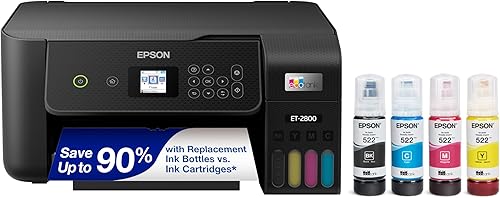
Buy the ET-2800 for regular homework, letters, individual copies and scans if you want Epson's refillable system. Its flatbed lets you place a document or photo on the glass without feeding the original through a paper path.
Skip it for frequent two-sided packets, where manual reloading becomes a repeated chore. Also avoid choosing it solely because it has a scanner; scanning and copying are shared functions across this comparison.
The Epson EcoTank ET-2800 review takes a closer look at its fit for basic home printing.
Canon MegaTank G3270: for a simple Canon setup
Buy the G3270 if you want Canon's tank system and mostly send straightforward jobs from your devices. It provides the same advertised ink yields as the G3290 without automatic duplex.
Skip it if you often work through menus at the printer or expect repeated two-sided jobs. Its 1.35 in square LCD is a reason to think about how often you'll rely on the onboard controls.
Read the Canon MegaTank G3270 review if this simpler model matches your needs.
How do ink yields and running costs compare?
Canon advertises higher yields for these models, especially for black pages. Those figures help compare ink capacity, but replacement bottle costs and your print mix determine running costs.
Canon advertises up to 6,000 black and 7,700 color pages per ink set for each MegaTank. Epson advertises up to 4,500 black and 7,500 color pages per set for the ET-2800.
The black-page gap matters more to a household printing text-heavy worksheets than the small color-page gap. Still, don't turn either figure into a promise about how many months a refill will last.
Page coverage changes ink use. A brief letter, a full-page color chart and a photo don't use the same amount, and maintenance can consume ink too.
For a useful comparison, check the correct replacement bottles and estimate how much black versus color work you do. Don't calculate every color document as though it uses only color ink.
All 3 include ink bottles, and both brands advertise up to 2 years of included ink. Treat that as a usage-based claim, not a calendar guarantee or an ink shelf-life statement.
Our guide to whether ink tank printers are worth it explains how print volume changes the value of a refillable system.
When is automatic duplex worth choosing?
Choose automatic duplex when two-sided printing is a weekly habit. It reduces the work of reloading paper and checking which way each sheet should face.
For example, a household printing repeated reading packets gains more from duplex than one printing shipping documents or single-page notices. Count the jobs that need both sides, not just your total pages.
With the single-sided models, follow the print dialog and printer instructions for manual duplex. Start with a short sample before committing to a large stack, since feed direction and page order can be easy to mix up.
Automatic duplex also doesn't mean every paper type can be printed on both sides. Follow the supported media guidance, especially for photo paper and heavier sheets.
Our guide to duplex and automatic document feeders explains another key distinction: turning printed sheets and feeding originals for scanning are separate features.
What should you expect from scanning, controls and speed?
All 3 handle basic print, copy and scan tasks, but your workflow determines which controls matter. A household that starts most jobs from a laptop may care less about the display than someone making copies at the printer.
The ET-2800 has an LCD, while the G3290 offers the larger touchscreen described above. Think about who will use the printer and whether they prefer physical controls, menus or an app.
For occasional scans, place originals straight, keep the glass clean and preview the crop before saving. Use a document format for paperwork and an image format when preserving a photo as an image file.
If you need to digitize stacks, confirm document-feeding features before choosing. The ability to scan a page doesn't tell you how much work a long scanning session will require.
Canon gives both models speeds of 11 black and 6 color pages per minute; Epson gives the ET-2800 10 black and 5 color pages per minute. Those modest differences shouldn't outweigh a feature you use every day.
Actual job time also includes processing, paper handling and your chosen quality setting. These models fit home routines better than a workflow built around urgent, long print queues.
Which is better for photos and creative projects?
The G3290 has the clearest documented photo features here, including borderless photos up to 8.5 x 11 in. That makes it worth considering for family pictures and creative work alongside documents.
It uses pigment black and dye-based color inks, and supports media including photo paper, envelopes and banners. Its stated photo-paper capacity is up to 20 sheets of 4 x 6 in paper.
Those features don't guarantee a print-quality winner across all 3 printers. Choose around the sizes, borders and paper types your projects require rather than assuming one brand always produces better photos.
For any inkjet, match the paper setting to the loaded media. Plain-paper settings on photo paper can produce disappointing results even when the image file is good.
Check cropping before printing a borderless image, since filling the sheet can cut off content near its edges. Start with one copy before producing a batch of invitations or family photos.
The complete guide to ink tank printers for home covers how documents, photos and creative projects affect the wider buying decision.
How should you set up a new tank printer?
Reserve time for filling, initial setup and a small first print job. A tank printer needs more preparation than simply connecting power and sending a document.
Choose a stable, level surface with room to load paper, lift the scanner lid and reach the tanks. Check operating space with trays open rather than judging fit from a closed printer.
Follow the exact model's setup sequence for unpacking, installing any required parts and filling the tanks. Don't guess at the order based on a video for a similar printer.
Match each bottle to the correct tank and confirm the ink family before opening it. For the G3290, the compatible bottles are Canon GI-21 pigment black and dye-based cyan, magenta and yellow.
Leave the printer powered as directed while it completes its initial ink preparation. Don't interrupt the process because the machine seems busy without producing a page.
Install the official software for your device, then connect using the supported wireless or USB method. During wireless setup, follow the model's network instructions and keep your device on the intended home network.
Print a short document, make a copy and save a scan before putting away the packaging. Checking those basic functions early helps separate connection problems from print-setting mistakes.
What care helps prevent wasted ink and paper?
Regular use and measured maintenance are better than repeated cleaning cycles. Tank printers hold plenty of ink, but that doesn't make unnecessary cleaning harmless.
Follow the manual's advice for idle periods and power down using the printer's own controls. Avoid routinely cutting its power at a wall switch while it's still working.
If a color disappears or text develops gaps, run the recommended nozzle check first. Use that pattern to decide whether cleaning is needed rather than launching several cleaning cycles in a row.
After a cleaning cycle, follow the recommended wait and recheck procedure. Persistent missing sections need further diagnosis, not an endless sequence of ink-consuming cleanings.
Keep refill areas clean, avoid touching bottle openings and stop filling as directed. Don't mix inks because the colors look alike or because bottles carry the same brand name.
Epson recommends genuine ink and warns that damage from non-genuine ink may fall outside its limited warranty. For a walkthrough of refill preparation, see how to refill an Epson EcoTank.
Long gaps between jobs deserve attention before you buy. Our guide to EcoTank ink drying during infrequent use explains the care issues behind occasional printing.
What mistakes should you avoid before buying?
Don't buy around the largest yield number while overlooking your daily tasks. A printer can hold enough ink for your needs and still create extra work on every job.
Avoid treating “wireless” as a promise that every phone, computer or app works the same way. Confirm support for your devices and preferred printing method before choosing.
Don't assume automatic two-sided printing includes two-sided scanning or automatic feeding of originals. If scanning is central to your work, make that a separate buying requirement.
Avoid buying a large ink supply for a printer that will sit unused for months. For rare, mostly black-text jobs, compare the category with laser printing before committing to either refillable system.
Finally, don't overlook the space around the machine. Paper loading, lid clearance and access for refills matter more in daily use than whether the printer just fits on a shelf.
Epson EcoTank vs Canon MegaTank: which should you choose?
Pick the G3290 if frequent two-sided documents drive your decision. Choose the ET-2800 if you prefer Epson for regular, mostly one-sided household work, or the G3270 if you want a simple Canon routine.
For a shared home office, reducing repeated page handling is the strongest reason to choose the G3290. For lighter tasks, decide whether the simpler models already cover everything you'll do each week.
If neither your workload nor your preferred ink system points clearly to Epson, there's no need to choose the ET-2800 just for scanning. Both Canon options also provide that function.
Before ordering, write down your main job type, how often you print and whether duplex is essential. Those 3 answers make the Epson EcoTank vs Canon MegaTank choice more useful than a brand-wide verdict.
If you're still comparing tank systems, use our Epson EcoTank vs HP Smart Tank guide to check the next alternative against the same needs.
Frequently asked questions
Is Epson EcoTank or Canon MegaTank cheaper to run?
Neither brand wins on page yield alone; compare the correct replacement bottles, your balance of black and color pages, and how often you print. These Canon models have higher advertised yields, but photos, dense color pages and maintenance use can change how far a refill goes.
Which printer has automatic two-sided printing?
The Canon MegaTank G3290 has automatic two-sided printing; the Epson EcoTank ET-2800 and Canon MegaTank G3270 print single-sided, so duplex jobs require you to reinsert the paper. Choose the G3290 if reports, reading packets or other multipage documents regularly need printing on both sides.
Can these printers scan and copy?
All 3 printers can scan and copy as well as print; the ET-2800 includes a flatbed for individual documents and photos placed on the glass. If you need to scan stacks of paperwork, confirm the exact model's document-feeding features before buying; automatic duplex printing doesn't guarantee scanning capabilities.
Should I choose an Epson EcoTank or a Canon MegaTank?
Choose by your routine rather than the brand name; the G3290 is the clearest fit for frequent two-sided documents, while the ET-2800 and G3270 suit mostly single-sided home printing. Between those 2, weigh your preferred ink system, replacement bottle availability and how you expect to control print jobs.
Are tank printers suitable for occasional printing?
Tank printers make more sense for regular use than for months of storage between jobs; liquid ink can dry in print-head nozzles during long idle periods, so follow the printer's care guidance. If you rarely print and mainly need black text, compare a laser printer before choosing either tank system.