11 Best Epson EcoTank Printers (October 2026)
The best Epson EcoTank printers include the Epson EcoTank ET-2803 for everyday home printing, the Epson EcoTank ET-2980 for two-sided schoolwork, and the Epson EcoTank ET-2800 for homework and forms.
On this page (8 sections)
- How we chose the best Epson EcoTank printers
- The best Epson EcoTank printers for home and office
- Which EcoTank features save the most work?
- How much printing makes an EcoTank worthwhile?
- How should you set up an Epson EcoTank?
- How do you refill and care for an EcoTank?
- Which buying mistakes should you avoid?
- Which best Epson EcoTank pick fits your routine?
The best Epson EcoTank printer for most homes is the ET-2803, provided you mainly print one-sided documents and scan individual originals. Choose the ET-2980 for regular two-sided work, or the ET-4950 for office paperwork that needs batch scanning and fax.
Start with the jobs you repeat each week. A printer that turns pages or feeds originals automatically can save more effort than a larger ink supply.
For a broader comparison, see our best ink tank printers guide. Our Epson EcoTank overview explains the tank system, while the Epson 502 and 522 ink guide helps you match replacement bottles.
Our picks at a glance
-
1
-
2

-
3
- 4
 Best for busy home officesCheck it
 - 5
 Best for occasional office paperworkCheck it
 - 6
 Best for shared document workloadsCheck it
 - 7
 Best for phone-first householdsCheck it
 - 8
 Best for simple wireless workflowsCheck it
 - 9
 Best for small shared desksCheck it
 - 10
 Best for modest fax workloadsCheck it
 - 11
 Best for routine family documentsCheck it
How we chose the best Epson EcoTank printers
Everyday usefulness comes first: we compared paper handling, scanning tools, connections and print speeds against common home and office jobs. The scores favor models that fit those needs without requiring features many households won't use.
The highest-ranked home pick isn't automatically the right office pick. Someone processing forms every morning should give an ADF and automatic duplex more weight than someone printing homework twice a week.
Ink yields are Epson's estimates. Included ink and replacement-set yields describe different supplies, so compare like with like rather than choosing the largest number.
| Product | Best for | Functions | Duplex | Print speed | Our score |
|---|---|---|---|---|---|
| Epson EcoTank ET-2803 | everyday home printing | Print, scan, copy | Simplex | 10 black, 5 color pages per minute | 8.7 |
| Epson EcoTank ET-2980 | two-sided schoolwork | Print, scan, copy | Automatic | 15 black, 8 color pages per minute | 8.5 |
| Epson EcoTank ET-2800 | homework and forms | Print, scan, copy | Simplex | 10 black, 5 color pages per minute | 8.4 |
| Epson EcoTank ET-4950 | busy home offices | Print, scan, copy, fax | Automatic | 8.2 | |
| Epson EcoTank ET-4800 | occasional office paperwork | Print, scan, copy, fax | Manual | 10 black, 5 color pages per minute | 8.1 |
| Epson EcoTank ET-3950 | shared document workloads | Print, scan, copy | Automatic | 18 black, 9 color ISO pages per minute | 8.1 |
| Epson EcoTank ET-2903 | phone-first households | Print, scan, copy | 8.0 | ||
| Epson EcoTank ET-2400 | simple wireless workflows | Print, scan, copy | Manual | 10 black, 5 color pages per minute | 7.7 |
| Epson EcoTank ET-2900 | small shared desks | Print, scan, copy | 7.6 | ||
| Epson EcoTank ET-4903 | modest fax workloads | Print, scan, copy, fax | 7.4 | ||
| Epson EcoTank ET-2410 | routine family documents | Print, scan, copy | 7.3 |
The best Epson EcoTank printers for home and office
Choose by workload: the ET-2803 covers ordinary household jobs, the ET-2980 simplifies two-sided output, and the office models reduce manual document handling. The products remain in score order below.
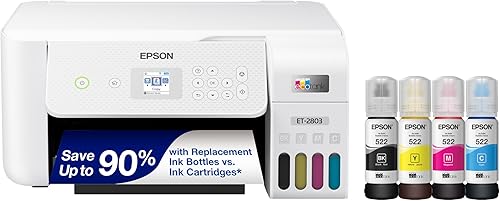
1. Epson EcoTank ET-2803: best Epson EcoTank for everyday homes
Epson EcoTank ET-2803
- Refillable ink tanks
- Flatbed scanner and color display
- AirPrint and Epson Smart Panel
- Voice-activated printing
A practical home all-in-one for homework, forms and color documents. Choose it when individual scans and mostly one-sided printing cover your routine.
Pros
- AirPrint for compatible Apple devices
- Flatbed for individual originals
- Color display for printer controls
Cons
- No automatic duplex printing
- Modest speed for long documents
The ET-2803 suits a household printing school pages, forms, recipes and occasional color documents. Its flatbed also works for copying a signed page or scanning an individual photo.
AirPrint and Epson Smart Panel make it a useful starting point for homes that send jobs from different devices. Voice-activated printing is another option, though the practical reason to choose it is ordinary wireless access.
Epson estimates up to 4,500 black and 7,500 color pages per replacement set. Your mix of text, graphics and photos will affect how far the ink goes.
Skip it if two-sided packets are a weekly task or you regularly scan loose document stacks. Automatic duplex and an ADF remove different chores, and this model's strengths are simpler household jobs.
Before buying, picture your longest normal document. A few forms fit this printer's role better than recurring reports that leave you waiting and turning pages.
2. Epson EcoTank ET-2980
Epson EcoTank ET-2980
- Automatic duplex printing
- Wi-Fi and USB
- Epson Smart Panel app
- 100-sheet paper capacity
A good step up for households printing reports, reading packets and assignments on both sides. Mobile printing and scanning also suit a shared family printer.
Pros
- Turns pages automatically for duplex jobs
- Faster than the basic ET-2800 models
- Phone printing and scanning
Cons
- Smaller paper supply than the ET-4950
- Not the pick for regular batch scanning
The ET-2980 is the better household choice when you regularly print reading packets, reports or assignments on both sides. Automatic duplex removes the need to reload the first side in the correct direction.
Its rated speed is 15 black and 8 color pages per minute. That step up matters more for recurring document runs than for an occasional single-page form.
The included ink is rated for up to 6,600 black and 5,500 color pages. Epson describes that supply as lasting up to 3 years, but a busy household can use it sooner.
Choose it when output handling matters more than feeding scan stacks. If several family members print throughout the week, the combination of mobile access and automatic page turning addresses a common shared-printer routine.
Skip it for paperwork-heavy office work where batch scanning is essential. For a simpler alternative, our ET-2800 review explains the basic home model.
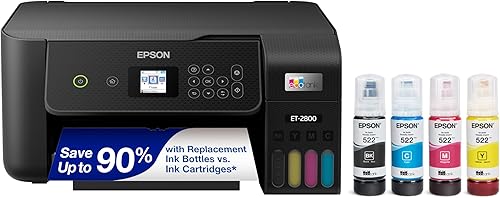
3. Epson EcoTank ET-2800
Epson EcoTank ET-2800
- Refillable tanks
- Flatbed scanner
- Wi-Fi printing
- Color display
A straightforward choice for school pages, household records and occasional color projects. Its flatbed suits one original at a time.
Pros
- Wireless access from multiple devices
- Flatbed scanning and copying
- Display for common tasks
Cons
- No automatic duplex printing
- Slow choice for frequent long print runs
The ET-2800 fits homes that want to print documents, copy individual pages and scan occasional originals. It covers those core jobs without making office document handling the focus.
Its flatbed and color display suit tasks you handle one at a time. Place the original on the glass, check its position and use the controls for a copy or scan.
The core speed and replacement ink yields match the ET-2803's stated figures. Don't choose between them expecting a major jump in ordinary document output.
Instead, decide which connection features your household needs. The ET-2803 has explicit support for AirPrint, voice commands and Epson Smart Panel, which gives phone users clearer reasons to choose it.
Skip the ET-2800 if automatic two-sided printing would be useful every week. A tank printer can hold plenty of ink while still leaving you with manual paper handling.
4. Epson EcoTank ET-4950
Epson EcoTank ET-4950
- Automatic duplex printing
- ADF and fax
- 250-sheet paper tray
- 2.4 in color display
The strongest fit here for offices that print packets, scan stacks and still use fax. Its larger tray reduces interruptions during ordinary document work.
Pros
- ADF for loose multi-page originals
- Automatic two-sided printing
- Larger paper tray
Cons
- Unnecessary features for light home use
- Fax adds no value if your work is fully digital
The ET-4950 is the strongest fit here for a home office with recurring print packets, loose scan stacks and fax work. An ADF, automatic duplex and a 250-sheet tray address separate parts of that routine.
The larger tray helps when you mostly use the same plain paper. It reduces reloads, but switching between letterhead, envelopes or other media still requires attention to the paper settings.
Rated output is 18 black and 9 color ISO pages per minute. Ethernet also gives you a wired network option when the printer has a fixed office location.
Choose it if document handling interrupts your work often enough to justify the extra features. Its 2.4-inch display provides more screen space than the smaller displays on several home models here.
Skip it if you rarely scan stacks and never fax. For short household jobs, those office tools may sit unused while a simpler model covers the work.
5. Epson EcoTank ET-4800
Epson EcoTank ET-4800
- ADF and fax
- Flatbed scanner
- Wi-Fi and Ethernet
- Refillable ink tanks
Choose this for modest print volumes with recurring multi-page scans or occasional faxing. It prioritizes document handling over fast output and automatic duplex.
Pros
- ADF and flatbed for different originals
- Fax capability
- Wired network connection
Cons
- Manual paper turning for duplex jobs
- Slower than the ET-4950
The ET-4800 suits modest print volumes combined with regular multi-page scanning or occasional faxing. Its ADF and flatbed let you handle loose sheets and individual originals in different ways.
Use the feeder for suitable document stacks and the glass for photos or delicate pages. Remove staples and check the originals before feeding them.
The main compromise is manual duplex printing. You must turn and reload the paper for two-sided jobs, so this model makes more sense when scanning work outweighs long print runs.
Ethernet is useful for a printer that stays beside a router or network connection. Wi-Fi offers flexibility when a cable route would be awkward.
Choose it for a small office that receives paperwork more often than it prints large packets. Skip it if automatic two-sided output is central to your routine; our ET-4800 review covers that tradeoff in more detail.
6. Epson EcoTank ET-3950
Epson EcoTank ET-3950
- Automatic duplex printing
- Flatbed and ADF scanning
- Wi-Fi Direct and Ethernet
- 18 black and 9 color ISO pages per minute
A useful match for several people sharing regular printing and scanning work. Automatic duplex, an ADF and wired or wireless connections address common home office needs.
Pros
- Automatic two-sided printing
- ADF for document stacks
- Several connection options
Cons
- More printer than occasional users need
- Heavier than the basic ET-2803
The ET-3950 fits a shared home workspace where several people print documents and scan loose originals. Automatic duplex and an ADF reduce the two chores that basic all-in-ones leave to you.
Its rated output matches the ET-4950's speed. Choose between these models around your document tools and paper-handling needs rather than expecting a speed advantage from one.
Epson gives ink bottle yields of up to 8,500 black and 6,500 color pages. Keep those figures separate from claims about the ink supplied in the box.
Wi-Fi Direct, Wi-Fi 5, Ethernet and USB provide several ways to connect. A fixed office can use a wired connection, while other users can work wirelessly.
Pick it when recurring document work justifies both faster output and easier scanning. Skip it for occasional forms and isolated copies, where the added document features won't change much about your day.
7. Epson EcoTank ET-2903
Epson EcoTank ET-2903
- 1.44 in color display
- 100-sheet paper tray
- AirPrint and Mopria support
- Epson Smart Panel app
A home all-in-one with clear mobile printing options for compatible Apple and Android devices. It suits short print jobs and individual flatbed scans.
Pros
- AirPrint and Mopria support
- Color display for controls
- Mobile scanning through supported services
Cons
- Smaller tray than the ET-4950
- Choose another model for an ADF
The ET-2903 suits households that handle printing from phones and tablets. AirPrint, Mopria Print Service, Mopria Scan and Epson Smart Panel give compatible devices clear routes to common jobs.
The 1.44-inch color display provides local controls, while the flatbed handles individual originals. This combination suits someone who prints from a phone but still wants to copy a page at the printer.
Its rated output is 11 black and 6 color ISO pages per minute. Think short household jobs rather than repeated long reports.
Epson rates the included ink for up to 3,600 black and 6,500 color pages. Those are supply estimates, not a reason to print unnecessary pages or expect the ink to last a fixed number of years.
Choose it for mobile access and ordinary home documents. Skip it if you need an ADF, and choose a confirmed automatic-duplex model if regular two-sided output matters.
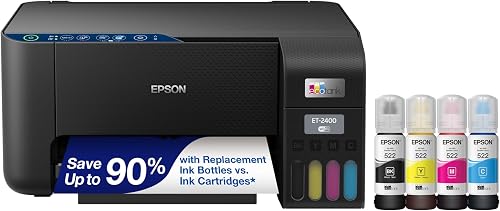
8. Epson EcoTank ET-2400
Epson EcoTank ET-2400
- Refillable tanks
- Flatbed scanner
- Wi-Fi and USB connectivity
- 100-sheet rear-feed tray
A basic option for users who send jobs from a computer or mobile device and scan individual originals. Manual duplex suits occasional two-sided work.
Pros
- Wireless or USB connection
- Flatbed scanning and copying
- Refillable ink supply
Cons
- Manual duplex printing
- Rear-feed tray needs access
The ET-2400 fits users who send most jobs from a computer or mobile device and need occasional flatbed scans. Its role is basic home printing rather than office document handling.
The 100-sheet rear-feed tray needs room for loading and supporting paper. A printer can fit on a shelf yet still be awkward to use if the paper path is blocked.
Epson estimates up to 4,500 black and 7,200 color pages per replacement set. As with the other tank models, page coverage affects how often you'll refill.
Manual duplex is manageable for occasional two-sided forms. Print a single sheet first to establish the correct reload direction before committing to a longer document.
Choose it when wireless access, a flatbed and refillable tanks cover your needs. Skip it if you want automatic page turning or plan to feed stacks of originals through a scanner.
9. Epson EcoTank ET-2900
Epson EcoTank ET-2900
- 1.44 in color display
- 100-sheet paper tray
- Wi-Fi and mobile printing
- Flatbed scanner
A compact black all-in-one for short household print jobs and individual scans. Its screen provides local controls alongside mobile access.
Pros
- Compact stated dimensions
- Color display
- Epson Smart Panel support
Cons
- Modest speed for long documents
- Limited paper supply for large batches
The ET-2900 is a compact black all-in-one for a shared desk or household work area. Its stated dimensions are 14.2 inches wide, 12.5 inches deep and 6.4 inches high.
Leave additional space for paper handling and lifting the scanner lid. The closed body dimensions alone don't tell you whether the printer will be comfortable inside a cabinet.
Its display, tray capacity and rated print speeds match the ET-2903's core figures. The white ET-2903 therefore isn't a clear upgrade in basic output speed.
Epson Smart Panel supports printing and scanning from compatible devices. Set up each household device before an urgent job, rather than assuming one successful connection covers everyone's needs.
Choose this model when its black finish and compact body suit your workspace. Skip it for regular scan stacks, and favor a confirmed duplex model if page turning is already a frequent chore.
10. Epson EcoTank ET-4903
Epson EcoTank ET-4903
- Fax and ADF
- 1.44 in color display
- 100-sheet paper tray
- AirPrint and Mopria support
A fit for light office output with recurring scan stacks and a real need for fax. Choose it for document intake rather than high-volume printing.
Pros
- ADF for loose originals
- Fax capability
- Mobile printing and scanning options
Cons
- Smaller tray than the ET-4950
- Not a confirmed automatic-duplex choice
The ET-4903 fits a light home office that needs fax and an ADF but prints mostly short jobs. It makes sense when incoming paperwork creates more work than printed output.
The flatbed remains useful for individual originals that shouldn't go through a feeder. Keep that access in mind when choosing its position on a desk or shelf.
Its 100-sheet tray and rated speed match a modest workload. If several people regularly send long jobs, the ET-4950 offers a larger paper supply and faster stated output.
Mobile support includes AirPrint and Mopria services for compatible devices. Ethernet and Wi-Fi also let you choose a connection that suits the office layout.
Buy it because fax and batch scanning solve actual tasks, rather than because an office label sounds useful. If automatic two-sided printing is required, choose one of the confirmed duplex models instead.
11. Epson EcoTank ET-2410
Epson EcoTank ET-2410
- Refillable tanks
- Flatbed scanner
- 100-sheet paper tray
- Epson Smart Panel app
A simple all-in-one for forms, school pages and occasional color printing. It works best when short jobs and one original at a time are normal.
Pros
- Flatbed scanning
- Wi-Fi and USB connectivity
- Mobile printing and scanning
Cons
- Choose another model for batch scanning
- Not a confirmed automatic-duplex choice
The ET-2410 suits routine family documents and short color jobs. Its flatbed scanner, wireless access and refillable tanks cover everyday work without making batch document handling the focus.
It shares the ET-2900's stated body dimensions and rated print speeds. Choose around the controls and workflow you want rather than expecting a large difference in output pace.
The Smart Panel app supports mobile printing and scanning. USB is another option for a computer that sits beside the printer.
A flatbed works well for copying a single signed form or saving an individual page. It becomes tedious when every job involves a stack that you must position sheet by sheet.
Choose it if those single-page tasks describe your routine. Skip it for recurring scan batches, and select a confirmed automatic-duplex option when two-sided printing is more than an occasional need.
Which EcoTank features save the most work?
Automatic duplex saves paper-turning work; an ADF saves original-feeding work. Choose the feature that removes your recurring chore, because one doesn't replace the other.
Automatic duplex for reports and packets
Automatic duplex prints both sides without asking you to reload the first side. It's useful for reading packets, reports and documents you want to file without unnecessary bulk.
Check the binding setting before a long job. Long-edge binding normally suits portrait documents, while the wrong choice can leave the reverse side upside down.
An ADF for loose document stacks
An ADF feeds suitable originals through the scanner. It saves repeated trips to the glass when you need to save a multi-page document as one file.
An ADF doesn't guarantee automatic two-sided scanning. Check that specific function if your originals have content on both sides, and use the flatbed for fragile, bound or unsuitable material.
Our guide to duplex printing and ADF features explains which tool fits each task.
Paper capacity for repeated plain-paper jobs
A larger tray matters most when you repeatedly print on the same paper. It helps less if you constantly switch between different media.
Keep a small supply of suitable paper nearby. Buying a larger tray won't solve curled sheets, damp paper or incorrect paper-type settings.
How much printing makes an EcoTank worthwhile?
Regular use makes better sense than buying a large ink supply for rare jobs. Count a normal month's documents and consider how often the printer would sit idle.
A family printing school pages each week has a different need from someone printing a travel document every few months. Long gaps between jobs can make inkjet care more relevant than ink capacity.
Don't compare years-of-ink claims as though every household prints the same amount. Epson's ET-2803 claim, for example, is based on roughly 125 pages per month.
Photos and full-page graphics also use ink differently from lightly covered text pages. Cleaning cycles consume ink too, so yield figures are planning estimates rather than exact refill dates.
Before replacing an occasional-use printer, read whether ink tank printers are worth it and compare the expected work with the upfront commitment.
How should you set up an Epson EcoTank?
Follow the model's setup sequence and allow the initial ink process to finish. Prepare the workspace, paper and connection details before starting.
Place the printer on a stable, level surface with access to the scanner lid and paper path. Remove shipping materials according to the included instructions.
Match each bottle to the correct tank and follow the filling directions. Don't force a bottle or assume ink with a similar name belongs in the printer.
Use the prescribed software or app setup for your model. Let initial ink charging complete without interrupting power or trying to rush into the first document.
After setup, print a short document and scan a page to the device you'll actually use. Check page size, orientation and file destination before relying on the printer for urgent work.
For shared use, connect each person's device and give the printer a clear name. Keeping duplicate printer entries can lead to jobs being sent to an unavailable connection.
How do you refill and care for an EcoTank?
Use the correct bottles, check ink levels and respond to print defects in order. Repeated cleaning without checking the cause wastes ink and may leave the real problem unresolved.
The models here use different ink families. Our Epson ink bottle guide compares 502 and 522 bottles so you can confirm compatibility before refilling.
Follow the printer's fill marks and bottle instructions. Protect the surrounding surface, keep bottles upright and close the tanks securely when finished.
If output develops gaps or missing color, start with the model's nozzle-check procedure. Follow its cleaning directions and any required waiting periods instead of running repeated cycles immediately.
Keep scanner glass clean using the method in the manual. A mark on the glass can appear in copies even when the print system is working properly.
Use the power button for normal shutdown and let the printer finish. A large ink supply reduces refill frequency, but it doesn't remove the need for sensible inkjet care.
Which buying mistakes should you avoid?
Don't choose an EcoTank by ink yield or model number alone. A lower-maintenance workflow depends on the right paper handling, connections and controls.
Don't treat maximum print resolution as a simple photo-quality ranking. Paper choice, print settings and the image itself affect the finished result.
Don't assume legal-size printing means the flatbed scans a legal-size original. Printing and scanning limits are separate, so confirm the original size you need.
Don't buy fax capability just to get an office model. Decide whether fax is part of your work, then prioritize the features you'll use each week.
Finally, measure usable space with the lid and paper supports in mind. Leave room to refill tanks and remove paper without shifting the printer every time.
Which best Epson EcoTank pick fits your routine?
The best Epson EcoTank choice follows your weekly workload. Pick the ET-2803 for mostly one-sided household documents, or the ET-2980 when automatic duplex will save regular effort.
Choose the ET-3950 for shared printing and scan stacks. Move to the ET-4950 when its larger tray and fax fit an active office, or consider the ET-4800 for modest output with recurring scan and fax work.
Shortlist the simpler models only after deciding which controls and connections you need. Don't give up a feature you'll use every week just to gain ink capacity you may take years to consume.
If you're still choosing a tank system, read Epson EcoTank vs Canon MegaTank. Our complete EcoTank guide provides more context on the range and refill system.
Our top 3 picks at a glance
-
1
-
2
-
3
Frequently asked questions
Which Epson EcoTank printer is best for most homes?
The ET-2803 is the best starting point for households printing homework, forms and occasional color documents; it combines wireless printing with scanning and copying. Move to the ET-2980 for frequent two-sided documents, or choose the ET-4950 when batch scanning, fax and a larger paper tray support weekly work.
Which EcoTank models print on both sides automatically?
The ET-2980, ET-4950 and ET-3950 offer automatic duplex printing; choose one of these if two-sided output is a regular task. An automatic document feeder serves a different purpose: it moves originals through the scanner and does not, by itself, mean the printer turns printed pages automatically.
Do Epson EcoTank printers scan and copy?
All 11 models here scan and copy; the ET-4950, ET-4800, ET-3950 and ET-4903 include an automatic document feeder for loose multi-page originals. Use a flatbed for single sheets, photos and fragile originals, and check supported original sizes before planning to scan larger documents.
How do I choose between the ET-2800 and ET-2803?
Choose between the ET-2800 and ET-2803 based on the connection features you need, rather than expecting a large difference in basic document work; both offer wireless printing, flatbed scanning and a color display without automatic duplex. The ET-2803 explicitly supports AirPrint, voice-activated printing and Epson Smart Panel.
Is an EcoTank a good choice if I rarely print?
An EcoTank makes more sense for regular printing than for a few pages separated by long idle periods; a large ink supply does not remove inkjet maintenance needs. If you mainly print occasional black documents, compare a laser printer before committing to a refillable color inkjet.



