Epson EcoTank ET-2800 Review: Worth It? (October 2026)
This Epson EcoTank ET-2800 review recommends it for regular home printing, plus occasional flatbed scanning and copying. Choose the ET-2980 instead if you often print two-sided documents and want automatic page turning.
On this page (11 sections)
- Epson EcoTank ET-2800 review: who should buy it?
- How fast is the ET-2800 for everyday printing?
- How much ink does the ET-2800 provide?
- What does single-sided printing mean in practice?
- How should you set up the ET-2800?
- How do you care for an EcoTank between print jobs?
- Is the ET-2803 a better choice than the ET-2800?
- When is the ET-2980 worth choosing instead?
- Who should choose the Canon MegaTank G3270?
- Which buying mistakes should you avoid?
- Epson EcoTank ET-2800 review: the final decision
The Epson EcoTank ET-2800 is a sensible choice for regular home printing if you need color documents, occasional scans and copies, and can turn two-sided pages yourself. This Epson EcoTank ET-2800 review finds its strongest fit in homework, forms and household paperwork rather than long document runs.
The refillable tanks reduce cartridge changes, but a large ink supply doesn't remove everyday chores. Paper handling, scan habits and how often you print matter more than choosing the biggest page-yield number.
Epson EcoTank ET-2800 review: who should buy it?
Buy the ET-2800 if you print throughout the year and need one machine for documents, scans and copies. Skip it if frequent two-sided work or large scanning jobs define your week.
Epson EcoTank ET-2800
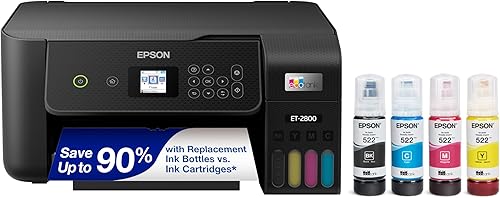
- Refillable ink tanks
- Flatbed scanner
- Copy function
- Wi-Fi
A practical match for regular homework, forms and color documents, with occasional scanning and copying. Skip it if manual page turning would become a weekly chore.
Pros
- Refillable tanks replace cartridges
- Wi-Fi printing from computers and mobile devices
- Flatbed scanning and copying
Cons
- No automatic duplex
- Modest stated color print speed
A household printing school worksheets, return forms, recipes and occasional color projects is a good match. These jobs benefit from bottled ink without making speed or automatic page handling the main requirement.
The flatbed is useful for an individual form, a photo or a page from a book that can rest safely on the glass. It also suits occasional copying when you don't want to create a scan file first.
A home office preparing long reports has a different need. The time spent turning paper and placing scan pages can matter more than how rarely you refill the tanks.
What matters most in an Epson EcoTank ET-2800 review?
Your normal print job matters more than maximum ink capacity. Think about the last few documents you printed: their length, how much color they used and whether they needed both sides of the paper.
If most were short, single-sided jobs, the ET-2800's basic workflow fits. If you regularly stopped to flip a stack or scan many separate sheets, choose around that repeated task.
Our guide to whether ink tank printers are worth it can help if you're still deciding whether refillable tanks suit your habits.
How fast is the ET-2800 for everyday printing?
The ET-2800's stated speeds suit short household jobs better than long color runs. Epson rates it at up to 10 pages per minute in black and 5 in color.
Those figures help compare printers, but document content, print settings and connection conditions affect completion time. A page of plain text and a full-page color image don't place the same demands on an inkjet.
For a few forms, waiting for output may be a minor part of the task. For a long school packet printed just before leaving home, printing speed and page handling become more noticeable.
Don't use speed figures as proof of photo quality or text sharpness. Choose a printer around the documents you need, then use the paper and quality settings appropriate for each job.
How much ink does the ET-2800 provide?
The ET-2800 offers a large ink supply for regular use, but page yields aren't a fixed household allowance. Epson states up to 4,500 black pages and 7,500 color pages per ink bottle set, plus up to 2 years of ink in the box.
Keep the black and color figures separate. Adding them together doesn't give you a reliable total for mixed homework, photos and documents.
The time claim also depends on your workload. A household printing many pages each week will use ink differently from someone printing a handful of forms each month.
Page coverage matters, too. Color-heavy graphics use ink differently from a short paragraph with a small logo, and printer maintenance can also consume ink.
Plan around compatible replacement bottles, not just the starter supply. Epson recommends genuine ink and warns that damage caused by non-genuine ink may fall outside its limited warranty.
For the broader trade-offs between tanks, cartridges and everyday use, start with our ink tank printer guide.
What does single-sided printing mean in practice?
Single-sided printing means you must turn and reload sheets yourself to make a two-sided document. That is manageable for occasional jobs but adds a repeated step to reports and packets.
Before printing a long document, use a short sample to learn which way the paper goes back into the tray. Marking a corner on a spare sheet can help you track orientation without wasting a full stack.
Follow the instructions in your print dialog, since page order and reload direction can vary with software and settings. Let freshly printed sheets dry before handling them again, especially when they carry substantial color.
Check the first completed pair of pages before continuing. A small orientation mistake can leave the reverse sides upside down or matched to the wrong pages.
For scanning, plan around the flatbed workflow: place a page, capture it and replace it with the next. If you regularly digitize stacks, make document feeding and scan handling a separate buying requirement.
How should you set up the ET-2800?
Set up the ET-2800 by following Epson's model-specific instructions from filling through initial ink charging. Give yourself time to finish that process before you need an urgent printout.
Choose a stable, level surface with room to load paper, open the scanner lid and collect finished pages. Measure the usable space with those tasks in mind rather than judging fit from the closed printer alone.
During filling, match each bottle to the correct tank and follow the indicated fill limits. Keep the bottles upright, protect the work surface and avoid forcing a bottle into place.
Allow the startup ink process to finish as instructed. Don't interrupt it simply because the printer hasn't produced a page yet.
For wireless use, connect through the supported setup process and check that your device can reach the printer on the home network. If discovery fails, check the network connection before repeatedly reinstalling software.
Finish with a short document and a simple scan. Confirm page size, orientation and where scan files are saved so your first real task doesn't become a setup exercise.
How do you care for an EcoTank between print jobs?
Use the printer regularly and check print quality before starting a large job. Refillable tanks hold more ink, but they don't remove the care needs of an inkjet printhead.
If pages develop gaps or missing colors, start with the printer's nozzle-check procedure and follow Epson's recommended cleaning steps. Repeated cleaning without checking the result can waste ink.
Keep paper clean, dry and flat, and set the paper guides for the sheets you're loading. A curled stack or mismatched paper setting can cause problems that look like a printer fault.
Check ink levels before an important run and refill according to the manual. Our guide to refilling an Epson EcoTank without a mess explains preparation and bottle handling.
If the printer may sit unused for long stretches, read whether EcoTank ink dries out when you print rarely. A large tank is less useful if your actual routine involves months without printing.
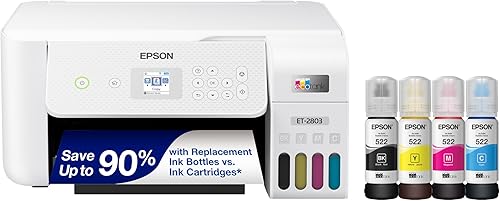
Is the ET-2803 a better choice than the ET-2800?
Choose the ET-2803 for its named mobile printing options, especially AirPrint, rather than expecting faster output. It supports Epson Smart Panel and voice-activated printing as well.
It shares the ET-2800's stated print speeds and single-sided workflow. Its flatbed scanner, copying function and color display serve similar everyday household tasks.
The ET-2803 suits someone who wants to print from Apple devices through AirPrint or use its other supported connection options. Confirm that your preferred device and app workflow fit before deciding.
Skip it as an upgrade if your complaint is manual page turning. Moving between these models doesn't solve that problem.
Our ET-2800 vs ET-2803 comparison looks more closely at this narrow choice.
When is the ET-2980 worth choosing instead?
Choose the ET-2980 when automatic two-sided printing saves you regular work. It also has higher stated speeds of 15 black and 8 color pages per minute.
That combination suits school packets, longer reports and households sharing one printer for several ongoing tasks. Automatic duplex removes the reload step that makes the ET-2800 less convenient for those jobs.
Its 100-sheet paper capacity still calls for attention during larger runs. Automatic page turning doesn't mean you can ignore paper supply or leave every job unattended.
Epson states that its included ink supports up to 6,600 black and 5,500 color pages. Those included-supply figures shouldn't be treated as a direct equivalent to every replacement-set yield quoted for another model.
The ET-2980 includes 502 ink bottles and supports mobile printing and scanning through Epson Smart Panel. Skip the upgrade if your usual jobs are short and single-sided and you're satisfied with that workflow.
Who should choose the Canon MegaTank G3270?
Choose the G3270 if black-document ink yield is a priority and you're open to Canon's refill system. Canon states up to 6,000 black and 7,700 color pages per ink set.
Those figures make it worth comparing for document-heavy households, but they don't guarantee a precise running-cost advantage. Your mix of pages, ink use and replacement supplies still matters.
The G3270 prints at stated speeds of 11 pages per minute in black and 6 in color. That modest difference from the ET-2800 shouldn't decide the purchase on its own.
It provides wireless printing, copying and scanning, plus a 1.35-inch square LCD. Its GI-21 refill bottles belong to a different ink system from Epson's, so check model compatibility when replacing supplies.
Skip the G3270 if automatic two-sided printing is your main requirement. It also prints single-sided, so it won't remove manual page turning from your routine.
For a wider view of the two systems, read Epson EcoTank vs Canon MegaTank.
Which buying mistakes should you avoid?
Avoid choosing by ink yield alone or assuming that all all-in-one printers handle documents the same way. Printing, scanning and copying describe functions, not the amount of paper handling each requires.
- Buying for an imagined workload: Use your recent printing habits rather than a plan to print much more someday.
- Confusing print duplex with scan duplex: Automatic two-sided printing doesn't guarantee automatic two-sided scanning.
- Assuming refill bottles are interchangeable: Match ink to the exact model, even within the same brand.
- Using the wrong paper setting: Select the loaded paper type and size before printing, especially for color work.
- Ignoring output handling: Leave space for finished sheets so they don't bend, fall or block later pages.
- Changing brands to solve the wrong problem: The G3270 offers another tank system, but it doesn't solve the ET-2800's manual duplex limitation.
If none of these models fits your document routine, compare the wider range in our best Epson EcoTank printers guide.
Epson EcoTank ET-2800 review: the final decision
Choose the ET-2800 for steady, everyday home printing with occasional flatbed scans and copies. This Epson EcoTank ET-2800 review favors moving to the ET-2980 when two-sided packets become a regular task.
Pick the ET-2803 when AirPrint or its other supported mobile options are central to your setup. Choose the Canon G3270 when its stated black-page yield and Canon refill system fit your needs, while accepting manual page turning.
Before ordering, settle 3 points: your usual job length, how often you print on both sides and how you scan documents. Use our Epson EcoTank guide to narrow the remaining choice around those habits.
Frequently asked questions
Is the Epson EcoTank ET-2800 worth considering?
The ET-2800 is worth considering for regular home printing, especially homework, forms and color documents with occasional scanning or copying; its refillable tanks suit ongoing use, but the lack of automatic duplex makes it less convenient for frequent two-sided packets. Choose around your weekly workload rather than ink capacity alone.
Can the Epson EcoTank ET-2800 print double-sided?
The ET-2800 can produce two-sided documents when you turn and reload the paper yourself, but it has no automatic duplex. Follow the print dialog's instructions and check sheet orientation with a short sample first; for frequent two-sided printing, the ET-2980 removes that manual page-turning step.
What does the Epson EcoTank ET-2800 do?
The ET-2800 prints color documents, scans items on its flatbed and makes copies; it uses refillable ink tanks and supports Wi-Fi printing from computers and mobile devices. These functions suit everyday household paperwork, but regular stacks of documents call for a closer look at the scanning workflow before buying.
How does the ET-2800 compare with the ET-2803?
The ET-2800 and ET-2803 share refillable tanks, flatbed scanning, copying and single-sided printing, with the same stated print speeds; the ET-2803 supports AirPrint, Epson Smart Panel and voice-activated printing. Choose between them around your device needs; switching to the ET-2803 won't add automatic duplex or faster stated output.



