Canon MegaTank G3270 Review: Worth It? (October 2026)
Our Canon MegaTank G3270 review finds it a good fit for regular home color printing, copying and scanning with refillable tanks. Choose the G3290 or G6020 instead if you often print double-sided documents.

On this page (9 sections)
- Canon MegaTank G3270 review: who should buy it?
- What do the G3270's features mean in daily use?
- How does the G3270 compare with similar printers?
- How much does the G3270's ink yield matter?
- How should you prepare for G3270 setup?
- How can you manage double-sided jobs on the G3270?
- Which alternative should you choose instead?
- What care habits and mistakes should you plan for?
- Canon MegaTank G3270 review: the buying decision
The verdict of this Canon MegaTank G3270 review is straightforward: buy it for regular home color documents, copying and scanning when most pages need printing on only one side. Choose an automatic-duplex model if two-sided paperwork is a weekly task.
Its refillable tanks suit families working through worksheets, forms and home projects. The important buying question is whether your normal print jobs fit its paper handling, controls and pace.
Canon MegaTank G3270 review: who should buy it?
The G3270 suits regular home printing with occasional scans and copies, especially when single-sided output is useful as it is. Think homework sheets, recipes, application forms and color reference pages.
Canon MegaTank G3270
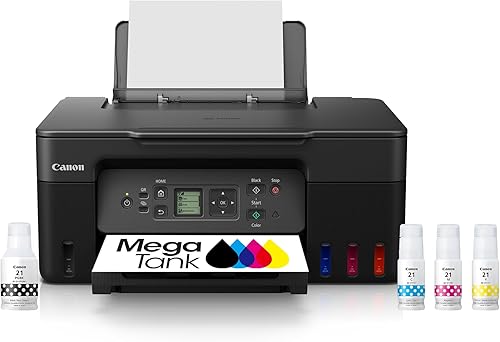
- Wireless print, copy and scan
- Up to 6,000 black and 7,700 color pages per ink set
- 1.35 in square LCD
- Single-sided printing
A good fit for regular worksheets, forms and color documents, plus occasional copying and scanning. Choose it when manually turning the occasional double-sided job is acceptable.
Pros
- Wireless print, copy and scan
- High stated page yield per ink set
- Includes ink bottles
Cons
- No automatic two-sided printing
- Small LCD for printer controls
A household printing across the week has a stronger reason to choose refillable tanks than someone printing a boarding pass a few times a year. Start with your real workload rather than the size of the included ink supply.
Wireless support makes sense when compatible phones and tablets are part of that routine. Check support for the exact devices and software you use before choosing where the printer will live.
Who should skip the Canon MegaTank G3270?
Skip the G3270 if automatic two-sided printing is essential. Manually turning a short form is manageable, but doing that for repeated reports or reading packets adds work to every job.
It also deserves a closer look if your printer must serve several people with urgent deadlines. A home printer can cover routine tasks without being the right tool for frequent stacks of time-sensitive documents.
For a wider explanation of refillable tanks and their trade-offs, start with our guide to ink tank printers for home.
What do the G3270's features mean in daily use?
The G3270 combines wireless printing, copying and scanning with a 1.35 in square LCD and USB connectivity. Its main convenience is covering several household tasks in one machine.
The small screen matters most if you prefer handling jobs at the printer. If you'll usually choose settings on a computer or mobile device, screen size may have less weight in your decision.
Canon gives print speeds of 11 black-and-white pages per minute and 6 color pages per minute. Use those figures to judge the scale of work it suits, rather than to predict the exact time for a photo-heavy file.
A few forms between other tasks are a different workload from a long color packet needed before school. Include preparation, paper handling and any manual page turning when thinking about how long a job will take.
For copying and scanning, consider the whole task as well as the function itself. Saving a scan with a clear name and checking that every page is readable are just as useful as getting the document into the printer.
How does the G3270 compare with similar printers?
Choose between these models by paper handling, connections and controls first. All 4 offer wireless printing, copying and scanning, so those shared functions don't settle the decision.
| Printer | Strongest buyer fit | Two-sided printing | Main distinction |
|---|---|---|---|
| Canon MegaTank G3290 | Frequent double-sided home documents | Automatic | 2.7 in color touchscreen |
| Epson EcoTank ET-2800 | Homes that prefer Epson | Manual page turning | Flatbed scanning and copying |
| Canon MegaTank G3270 | Mostly single-sided home documents | Manual page turning | Small LCD and USB connection |
| Canon PIXMA G6020 MegaTank | Home offices using wired networking | Automatic | Ethernet and USB connections |
The G3290 solves the G3270's clearest workflow limit. The G6020 is a better match when a wired network connection is part of your home-office plan.
The ET-2800 provides a brand alternative, but it doesn't solve the need to turn paper yourself. Switching brands is useful only if the other model better fits your household.
Our Epson EcoTank vs Canon MegaTank comparison covers the broader choice if you're still deciding between the 2 systems.
How much does the G3270's ink yield matter?
Canon states yields of up to 6,000 black-and-white pages and 7,700 color pages per ink set. These figures help compare ink capacity, but they don't predict your exact refill date.
Don't add the 2 numbers together as a promise for mixed printing. A household alternating between text pages, charts and photos uses ink differently from one printing mostly plain documents.
Photos, large filled areas and dense graphics can consume more ink than a page with a short paragraph. Print settings and maintenance also affect how far a set of bottles goes.
Estimate your monthly use by looking at a normal school or work month. Count the jobs you actually print, including color pages, rather than imagining a future project that may never happen.
Also separate ink capacity from overall value. The included supply matters, but so do replacement ink, paper, your time and the features you need each week.
If the printer will sit unused for long stretches, a large ink supply alone isn't a reason to buy it. Read whether ink tank printers are worth it before committing to this printer type.
How should you prepare for G3270 setup?
Prepare a suitable space, the correct software and time for the full setup sequence before filling the tanks. Follow Canon's instructions for the G3270 rather than adapting a guide for another tank printer.
The stated dimensions are 21.9 in deep, 16.4 in wide and 10.6 in high. Measure your intended spot and allow extra room for paper handling, cables and access during refills.
A shelf that fits the printer's outer dimensions may still be awkward for everyday use. Make sure you can load paper and reach the parts needed for routine care without moving the printer each time.
The box includes GI-21 ink bottles and print heads. Follow the model's directions for installing these parts, matching each bottle to the correct tank and completing the initial ink preparation.
Don't rush past a setup stage because ink is already in the tanks. Let each required process finish before sending your first document.
For wireless setup, have your network details ready and use Canon's official software instructions. Confirm printing and scanning from the devices you'll actually use, rather than assuming one successful connection covers every household device.
Finish with a short document and a scan. Check orientation, paper size and the scan's saved location so the first urgent job doesn't become a setup lesson.
How can you manage double-sided jobs on the G3270?
You can make double-sided documents by turning and reloading sheets yourself. The important part is learning the correct feed direction before attempting a long file.
Start with a 2-page document and mark one corner of a spare sheet. That shows which surface and edge the printer uses, reducing the chance of an upside-down second side.
If your software offers manual duplex instructions, follow its sequence. Otherwise, check its odd-page, even-page and page-order settings before splitting a longer job.
For a one-off form, this extra step may be acceptable. For weekly reading packets, the same step becomes a recurring chore and makes automatic duplexing more valuable.
Automatic duplex printing and automatic document feeding solve different jobs: one handles printed output, while the other feeds originals for scanning or copying. Our guide to duplex printing and document feeders explains how to choose between those needs.
Which alternative should you choose instead?
Choose the G3290 for frequent double-sided work, the ET-2800 for an Epson-based household, or the G6020 for Ethernet networking. Each has a clearer reason to buy than simply being another tank printer.
Canon G3290 for recurring school and home-office packets
The G3290 adds automatic two-sided printing and a 2.7 in color touchscreen. Those features suit a family that prints reading packets or a home worker who regularly produces documents to keep.
Its capacity is up to 100 plain-paper sheets or 20 sheets of 4 x 6 in photo paper. For larger runs, plan to reload paper rather than expecting the tray to hold the whole job.
Skip this step up if you rarely need duplex output and usually control printing from your device. Buy the extra convenience because it solves a recurring task.
Epson ET-2800 for households that prefer Epson
The ET-2800 suits buyers who want Epson's refillable-tank system with wireless printing and flatbed scanning. It remains a single-sided printer, so it fills a similar home role to the G3270.
Epson states yields of up to 4,500 black pages and 7,500 color pages per ink bottle set. That makes ink capacity worth comparing, but it doesn't guarantee a print-quality winner.
Skip it if automatic duplexing is the reason you're looking beyond the G3270. For refill planning, our guide to which Epson 502 and 522 ink bottles fit explains why exact model compatibility matters.
Canon G6020 for a wired home-office network
The G6020 suits a home office that wants Ethernet plus automatic two-sided printing. It also supports USB and wireless connections, giving you several ways to fit it into your workspace.
Its two-line LCD is a practical distinction from the G3290's color touchscreen. Choose it when the connection options matter more than having larger screen controls.
Skip it if your household has no use for Ethernet and your existing wireless arrangement meets your needs. Focus on the features you'll use each week.
What care habits and mistakes should you plan for?
Use the correct ink, suitable paper and the model's maintenance instructions to keep routine care manageable. Tank printers still need attention even though they avoid regular cartridge swaps.
Check the exact ink family before every refill. The G3270 uses GI-21 bottles, while the G6020 uses GI-20, so sharing a brand name doesn't make bottles interchangeable.
Keep ink bottles closed and stored as directed. During refills, follow the tank's fill guidance and don't force extra ink into a full tank.
Load paper neatly and select the matching size and paper type in the print settings. Incorrect settings can waste a sheet or produce an unexpected layout even when the printer is working correctly.
If a print has missing lines or colors, start with the printer's nozzle-check procedure. Follow the recommended next step instead of repeatedly running cleaning cycles, which consume ink.
Use the power button when shutting down and allow the shutdown process to finish. For extended periods without printing, follow Canon's storage and care guidance.
One buying mistake is choosing an inkjet solely for a large ink supply when the real workload is occasional black text. Compare ink tank and laser printers for home if color printing isn't a regular need.
Canon MegaTank G3270 review: the buying decision
Buy the G3270 for regular, mostly single-sided home color documents when copying and scanning also matter. Make that choice after confirming your space, device support and willingness to handle occasional duplex jobs manually.
Pick the G3290 when double-sided packets and larger screen controls would save effort. Choose the G6020 when Ethernet is useful, or the ET-2800 when you prefer Epson and don't need automatic duplexing.
Before ordering, describe your 3 most common print jobs and check how each would work on your chosen model. For more choices within the brand, browse the Canon MegaTank printer guide.
Frequently asked questions
Does the Canon MegaTank G3270 print on both sides?
The G3270 prints on one side at a time and has no automatic duplex function; for a double-sided document, you'll need to turn and reload the paper yourself. Choose the Canon G3290 or G6020 if two-sided schoolwork, reports or forms make up much of your printing.
Can the Canon MegaTank G3270 scan and copy?
Yes, the G3270 prints, scans and copies, so it suits homes that need more than document printing; it also supports wireless use with compatible smartphones and tablets. Before setup, check the software requirements for each device you plan to use, including the device that will handle scanning.
How many pages can the G3270 print with one set of ink?
Canon states yields of up to 6,000 black-and-white pages and 7,700 color pages per ink set; those are separate yield figures, not numbers to add together for a mixed workload. Dense graphics, photos, print settings and maintenance affect how far the ink goes in everyday use.
Is the Canon MegaTank G3270 a good home printer?
Yes, it fits homes that regularly print color worksheets, forms and documents and also need copying and scanning; its strongest fit is mostly single-sided work. If you print rarely, compare the benefits of refillable tanks with your actual needs; for frequent double-sided work, choose an automatic-duplex model.



