11 Best Refillable Ink Printers (October 2026)
The best refillable ink printers include the Epson EcoTank ET-2980 for everyday home printing, the Epson EcoTank ET-2800 for short home jobs, and the Canon MegaTank G3270 for single-sided schoolwork.
On this page (7 sections)
- How we chose the best refillable ink printers
- Best refillable ink printers for different needs
- What should you compare before choosing a refillable ink printer?
- Are refillable ink printers a good fit for rare printing?
- How should you set up a refillable ink printer?
- What care and refill mistakes should you avoid?
- Which best refillable ink printer fits your final shortlist?
The best refillable ink printer for most homes is the Epson EcoTank ET-2980, thanks to automatic two-sided printing and keyed refill bottles. Choose the Epson EcoTank ET-3950 for regular document stacks, or the Canon MegaTank G3270 for mainly single-sided work.
Start with the jobs you repeat each week: school worksheets, work reports, scans or color projects. A large ink supply won't replace a missing paper-handling feature.
Our best ink tank printers guide offers a broader shortlist. For more context on cartridge-free designs, see the best cartridge-free printers.
Our picks at a glance
-
1

-
2
-
3
- 4
 Best for faxing home officesCheck it
 - 5
 Best for busy document workflowsCheck it
 - 6
 Best for shared Canon workspacesCheck it
 - 7
 Best for frequent family documentsCheck it
 - 8
 Best for phone-first householdsCheck it
 - 9
 Best for single-sided craft projectsCheck it
 - 10
 Best for low-clearance desksCheck it
 - 11
 Best for longer paper batchesCheck it
How we chose the best refillable ink printers
Useful paper handling and clear refill methods drove our choices, followed by connections, speed and included ink. We compared the specs and features against common home and home-office tasks.
Automatic duplex matters for reports, an automatic document feeder matters for scanning stacks, and neither is essential for a few worksheets. A printer earns its place by fitting a routine, rather than having the longest feature list.
We kept included-ink estimates separate from practical features because printing habits change how long bottles last. This ink tank printer vs inkjet comparison explains how print volume affects the choice.
| Product | Best for | Functions | Duplex | Ink included | Our score |
|---|---|---|---|---|---|
| Epson EcoTank ET-2980 | everyday home printing | Print, copy, scan | Automatic | Up to 3 years | 8.5 |
| Epson EcoTank ET-2800 | short home jobs | Print, scan, copy | Simplex | Up to 2 years | 8.4 |
| Canon MegaTank G3270 | single-sided schoolwork | Print, copy, scan | Single-sided | 8.3 | |
| Epson EcoTank ET-4800 | faxing home offices | Print, scan, copy, fax | Manual | 8.1 | |
| Epson EcoTank ET-3950 | busy document workflows | Print, scan, copy | Automatic | 8.1 | |
| Canon PIXMA G6020 MegaTank | shared Canon workspaces | Print, copy, scan | Automatic | 8.0 | |
| HP Smart Tank 6003 | frequent family documents | Print, copy, scan | Automatic | Up to 3 years | 7.3 |
| HP Smart Tank 6001 | phone-first households | Print, copy, scan | Automatic | Up to 2 years | 7.2 |
| HP Smart Tank Plus 570 | single-sided craft projects | Print, copy, scan | Single-sided | Up to 2 years | 7.1 |
| HP Smart Tank 5100 | low-clearance desks | Print, copy, scan | Manual | 7.0 | |
| Brother INKvestment Tank 580 | longer paper batches | Print, copy, scan | Automatic | 7.0 |
Best refillable ink printers for different needs
Choose the ET-2980 for general home use, then move to another model for a specific need such as faxing, faster document work or a larger paper tray. The notes below explain where each choice fits and when to skip it.
Epson EcoTank ET-2980
- Keyed EcoFit refill bottles
- Automatic two-sided printing
- Print, copy and scan
- Up to 3 years of ink included
A practical family pick for schoolwork, household documents and phone printing, with automatic duplex to reduce paper handling.
Pros
- Automatic two-sided printing
- Keyed bottles help prevent color mix-ups
- Prints and scans from mobile devices
Cons
- 100-sheet paper capacity
- Choose an ADF model for regular document stacks
The Epson EcoTank ET-2980 suits a household sharing one printer for schoolwork, forms and longer documents. Automatic duplex removes the need to stand nearby and reload sheets halfway through a two-sided job.
Its keyed EcoFit bottles help prevent color mix-ups, while Epson Smart Panel supports printing and scanning from mobile devices. That combination fits families whose documents arrive on phones as often as on computers.
Epson gives included-ink yields of up to 6,600 black pages or 5,500 color pages, with an up-to-3-year supply claim. Those estimates help you plan supplies, but don't set a household replacement date.
The 100-sheet tray is enough for modest batches, though larger jobs need more attention. Skip this pick if scanning multi-page paperwork is your main task, and choose one of the ADF models below.
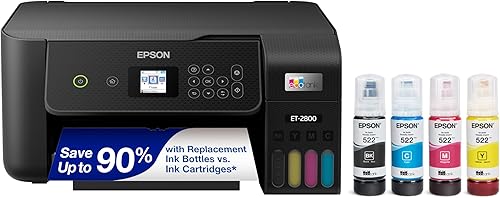
Epson EcoTank ET-2800
- Refillable four-color tanks
- Print, scan and copy
- Up to 2 years of ink included
- Wireless connectivity
A straightforward choice for short, single-sided jobs and occasional flatbed scans from a shared household printer.
Pros
- Flatbed scanner and copier
- Wireless printing from computers and phones
- Ink bottles included
Cons
- No automatic duplex
- Color print speed is 5 ppm
The Epson EcoTank ET-2800 is a good fit for short, mostly single-sided home jobs. Think permission slips, recipes and individual scans rather than lengthy reports that need printing on both sides.
Its flatbed scanner works for occasional originals, and Wi-Fi lets household members send jobs from computers or phones. You don't need to build your routine around one connected computer.
Epson gives yields of up to 4,500 black pages or 7,500 color pages per bottle set and advertises up to 2 years of included ink. Color output runs at up to 5 pages per minute, so leave time for longer batches.
Skip it if you regularly assemble two-sided packets, since it lacks automatic duplex. The ET-2980 is the more useful step up when page turning is the chore you want to remove.
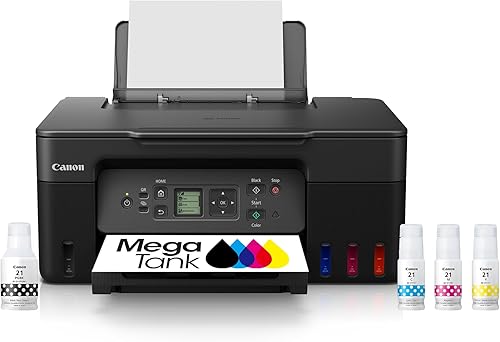
Canon MegaTank G3270
- Wireless print, copy and scan
- Up to 2 years of ink included
- 1.35 in square LCD
- Single-sided printing
Fits families printing worksheets, forms and color pages who don't need automatic two-sided output.
Pros
- Wireless print, copy and scan
- Ink included in the box
- LCD for printer controls
Cons
- No automatic duplex
- Small 1.35 in display
The Canon MegaTank G3270 suits schoolwork and household pages that usually stay single-sided. Wireless print, copy and scan functions cover those tasks without adding a document workflow you may never use.
Canon gives single-set yields of up to 6,000 black-and-white pages or 7,700 color pages, and an up-to-2-year included-ink claim. Treat those as supply estimates rather than reasons to choose it over a needed feature.
The 1.35 in square LCD offers on-printer controls in a small display. Buyers who prefer larger on-screen prompts should consider how often they'll use the printer's controls instead of a phone or computer.
Skip the G3270 for regular two-sided reports because it doesn't turn pages automatically. Our Canon MegaTank guide gives more context if you're choosing within Canon's tank family.
Epson EcoTank ET-4800
- Built-in automatic document feeder
- Fax, scan and copy
- EcoFit refill bottles
- Ethernet and USB
An ADF and fax capability make this a useful choice when handling incoming paperwork matters more than automatic duplex.
Pros
- Automatic document feeder
- Fax capability
- Ethernet and USB connections
Cons
- Manual two-sided printing
- Color print speed is 5 ppm
The Epson EcoTank ET-4800 is the pick for a home office that needs fax capability and an automatic document feeder. Those functions help with paperwork that must be sent, copied or saved as several pages.
An ADF saves placing each loose sheet on the scanner glass. Keep the flatbed for originals that shouldn't travel through a feeder, following the printer's document guidance.
Ethernet and USB offer wired connections, while EcoFit bottles handle tank refills. Epson gives replacement-ink yields of up to 4,500 black pages or 7,500 color pages.
Skip this model if automatic two-sided output is the feature you need most: duplex is manual. It makes more sense for handling incoming originals than for producing frequent two-sided packets, especially if fax is part of your routine.
Epson EcoTank ET-3950
- Automatic two-sided printing
- Flatbed and ADF scanning
- Ethernet and Wi-Fi
- Up to 18 ppm black
Combines automatic duplex, an ADF and wired networking for homes that regularly print and digitize longer documents.
Pros
- Automatic two-sided printing
- Flatbed and ADF scanner
- Ethernet and Wi-Fi
Cons
- More features than short print jobs require
- Weighs 15.9 lb
The Epson EcoTank ET-3950 suits a household or home office that prints longer jobs and regularly scans loose document stacks. Automatic duplex plus an ADF addresses both sides of that workflow.
Speeds of up to 18 ISO pages per minute in black and 9 in color make it worth considering when several people queue documents. Actual completion time also depends on settings, file content and whether pages print on both sides.
Wi-Fi and Ethernet let you choose a wireless location or a wired network connection. Use the flatbed for individual originals and the feeder for suitable multi-page documents.
Don't assume automatic print duplex means the scanner captures both sides of an original in one pass. Skip the ET-3950 if your routine is only a few short prints and occasional single-page scans.
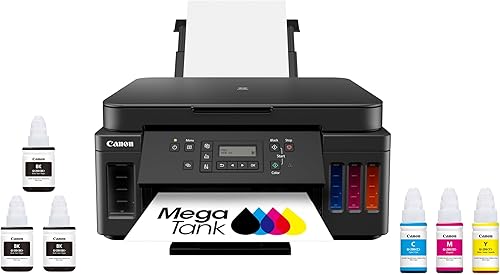
Canon PIXMA G6020 MegaTank
- Automatic two-sided printing
- Ethernet and USB
- Print, copy and scan
- Up to 2 years of ink included
A Canon option for shared home-office documents, with automatic duplex, Ethernet and extra black ink in the box.
Pros
- Automatic two-sided printing
- Ethernet and USB connections
- Full ink set plus 2 bonus black bottles
Cons
- Two-line display
- Weighs 17.8 lb
The Canon PIXMA G6020 MegaTank is a useful Canon choice for shared home-office documents. Automatic duplex and Ethernet address two practical needs: less page turning and a wired connection to your network.
The box includes a full ink set plus 2 bonus black bottles, which is useful for document-heavy households. Canon gives single-set yields of up to 6,000 black-and-white pages or 7,700 color pages.
A two-line LCD provides basic on-printer information, so don't choose it expecting a large control screen. Its print, copy and scan functions suit a mix of digital documents and occasional paper originals.
Skip it if a document feeder is central to your work, and consider the Epson ADF choices instead. At 17.8 lb, it also makes more sense in a permanent spot than somewhere you'll move it often.
HP Smart Tank 6003
- Up to 3 years of ink included
- Plug-in bottle refill system
- Automatic two-sided printing
- Print, copy and scan
Suits families printing regularly from phones and computers who want automatic duplex and bottles that drain without squeezing.
Pros
- Automatic two-sided printing
- Plug-in bottle refill system
- Mobile and wireless printing
Cons
- Black print speed is 12 ppm
- Weighs 14.1 lb
The HP Smart Tank 6003 fits families that regularly print documents and want automatic two-sided output. Mobile and wireless printing support a shared setup where jobs come from several devices.
HP gives included-ink yields of up to 6,000 black pages or 8,000 color pages, with an up-to-3-year supply claim. Look at those page estimates alongside your monthly volume rather than treating the year figure as a refill schedule.
The refill bottles plug into the tanks and drain without squeezing. This is useful if you prefer placing a bottle and letting the refill system control the flow.
It also copies, scans and supports borderless prints for occasional creative work. Skip it if multi-page scanning drives your choice, or if longer black document batches make its 12-page-per-minute speed a poor match.
HP Smart Tank 6001
- Up to 2 years of ink included
- Automatic two-sided printing
- HP Smart app support
- Print, copy and scan
HP Smart app and Apple AirPrint support suit households that send most jobs from mobile devices.
Pros
- Automatic two-sided printing
- HP Smart app and Apple AirPrint support
- Refill bottles drain without squeezing
Cons
- Color print speed is 7 ppm
- Weighs 14.1 lb
The HP Smart Tank 6001 suits phone-first households, with HP Smart app and Apple AirPrint support. Automatic duplex is useful when a document sent from your phone needs both sides of the sheet.
It also handles copying, scanning and borderless printing, so it can serve work documents and family projects. HP gives speeds of up to 12 pages per minute in black and 7 in color.
HP advertises up to 2 years of included ink, with yields of up to 6,000 black pages or 8,000 color pages. Its plug-in bottles drain without squeezing.
Choose it because its mobile options fit your devices and routine. Skip it if you need an ADF for frequent scanning stacks, and don't choose between the 6001 and 6003 on the advertised years of ink alone.
HP Smart Tank Plus 570
- Up to 2 years of ink included
- Plug-in bottle refill system
- Print, copy and scan
- Wireless connectivity
A fit for wireless color projects and borderless prints when automatic duplex isn't part of the routine.
Pros
- Borderless printing
- Wireless connectivity
- Bottles drain without squeezing
Cons
- No automatic duplex
- Paper capacity is 100 sheets
The HP Smart Tank Plus 570 fits single-sided color projects, household pages and occasional borderless prints. Wireless connectivity makes it useful when creative files and documents come from different devices.
HP's bottles plug into the tanks and drain without squeezing, and HP advertises up to 2 years of included ink. It also copies and scans for occasional paper-to-digital tasks.
Its 100-sheet capacity and single-sided printing suit modest batches better than long, two-sided packets. Skip it if you expect to print reports on both sides every week.
Before printing a craft batch, confirm the printer's supported paper type and use the matching print setting. Borderless capability doesn't mean every paper size or material is suitable; our HP Smart Tank setup guide helps with the first steps.
HP Smart Tank 5100
- Up to 3 years of ink included
- Print, copy and scan
- Wireless and Ethernet networking
- Manual duplex
Its 6.19 in body height suits desks with limited vertical space, provided you leave room to open the scanner and access paper.
Pros
- Wireless and Ethernet networking
- Low body height
- Prints, copies and scans
Cons
- Manual two-sided printing
- Color print speed is 5 ppm
The HP Smart Tank 5100 is worth considering for a desk with limited vertical space. Its body is 6.19 in high, but you still need clearance to open the scanner and reach the paper and tanks.
Wireless and Ethernet networking support a shared home-office setup. HP gives included-ink yields of up to 6,000 black or color pages and advertises an up-to-3-year supply.
Manual duplex means you'll reload sheets yourself for two-sided documents. Color speed is up to 5 pages per minute, so this is a better fit for short routine jobs than color batches needed in a hurry.
Choose it when body height and connections solve a real space problem. Skip it if the printer must sit under a shelf that blocks access, or if automatic duplex would save you regular work.
Brother INKvestment Tank 580
- 150-sheet paper tray
- Automatic two-sided printing
- Keyed refill bottles
- Up to 3 years of ink included
A 150-sheet tray and automatic duplex suit households that would rather load a paper batch than feed small jobs throughout the day.
Pros
- 150-sheet paper tray
- Automatic two-sided printing
- Bottle keys help prevent color mix-ups
Cons
- One-line LCD
- Choose an ADF model for regular document stacks
The Brother INKvestment Tank 580 suits households that print in batches and want fewer paper reloads. Its 150-sheet tray, automatic duplex and single-sheet manual feed slot give you useful options for everyday documents.
Wireless and USB connections support different desk arrangements, while Brother Mobile Connect handles mobile printing and device management. A one-line LCD provides basic messages rather than a large control display.
Brother says its keyed bottles help prevent filling the wrong color tank. Its up-to-3-year included-ink claim assumes 125 monthly pages, split between 60% black and 40% color.
Brother also includes a 3-year limited warranty; check the terms when planning longer-term ownership. Skip this choice if your main need is scanning document stacks, and choose an ADF model rather than buying around paper capacity alone.
What should you compare before choosing a refillable ink printer?
Match paper handling to your repeated jobs first, then compare ink supply, connections and physical fit. Start by writing down what you print and scan in a normal month.
Separate black documents, color pages and scanned originals. A family printing worksheets has different needs from a home office that scans signed forms every afternoon.
Which features make the best refillable ink printer for your routine?
Choose automatic duplex for frequent two-sided output and an ADF for frequent multi-page scanning. These features save different kinds of work, so one doesn't replace the other.
A flatbed suits individual originals, photos and items that shouldn't pass through a feeder. If your originals have text on both sides, confirm the scanning steps rather than assuming print duplex covers scanning.
Is a keyed bottle system useful?
Keyed bottles help prevent color mix-ups, while bottles that drain without squeezing reduce handling during a refill. Either approach still requires the correct ink family and careful attention to the tank labels.
Don't choose ink by bottle shape, brand name or color alone. Our Epson 502 and 522 ink guide explains why matching the bottle code to the printer matters.
How much included ink should influence your choice?
Page yields are more useful than years-of-ink claims when comparing your own printing habits. A year estimate depends on an assumed monthly volume, and that assumption may differ between models.
Text-heavy pages and full-page color images also use different amounts of ink. Don't add black and color yields together as a guaranteed total, or treat supply estimates as supported monthly workload limits.
Which connections and space checks matter?
Use Wi-Fi for flexible placement, Ethernet for a wired network, and USB for a direct computer connection. Make sure your chosen model supports the connection you plan to use.
Measure the working space, including open trays, scanner access and room for bottles during refills. A printer that fits a shelf when closed may still be awkward to load or scan with.
Are refillable ink printers a good fit for rare printing?
Refillable printers fit regular use better than months of inactivity. If you rarely print, a large ink supply may bring little benefit while leaving you with the care needs of an inkjet.
Compare the work you actually do, rather than buying for a future project that may never happen. Mostly black documents, little need for color and long gaps between jobs call for a broader printer comparison.
If you choose a tank model, follow its guidance for idle periods and routine care. Our guide to whether EcoTank ink dries out during rare printing explains the issue in more detail.
How should you set up a refillable ink printer?
Follow the model's setup order and allow the first ink charge to finish before starting normal work. Don't assume the steps match an older printer or another brand.
- Put the printer on a stable, level surface with room for loading and scanning.
- Remove transport materials as directed, including any inside access areas.
- Match every bottle's ink code and color to the correct tank.
- Fill according to the guide, stopping at the specified level without forcing ink in.
- Install any user-fitted parts in the required order and complete initial charging and alignment.
- Connect your devices through the brand's setup process and check print preferences.
Initial charging uses ink to prepare the print system, so the visible tank level may change during setup. Don't interrupt that process to top up unless the instructions tell you to.
Before sending a large job, print a short document and make a scan from each device you plan to use. Check paper size, orientation, page order and duplex settings while mistakes cost only a few sheets.
What care and refill mistakes should you avoid?
Use the correct ink, watch tank levels and follow the printer's maintenance prompts. Refillable tanks remove cartridge changes, but they don't remove printhead care or paper-feed problems.
Keep bottles capped and stored as the brand directs. Retain the ink code somewhere easy to find so the next refill doesn't depend on memory.
Refill on a protected, level surface, matching one color at a time. Don't squeeze bottles designed to drain on their own, mix ink families or fill beyond the stated limit.
Use the printer's normal power-off process so it can finish shutting down correctly. Follow its guidance for power connections and idle periods rather than repeatedly cutting power while it's working.
If a color disappears or lines break, start with the printer's nozzle-check procedure. Avoid running repeated cleaning cycles without checking the result, since cleaning uses ink.
For Epson models, our EcoTank printhead cleaning guide explains how to work through that process. A feed error or wrong paper setting needs a different fix from missing nozzles.
Keep paper dry, square the stack and adjust the guides without pinching it. Use a suitable quality setting for drafts, and preview web pages so menus, ads and blank pages don't waste supplies.
Which best refillable ink printer fits your final shortlist?
Pick the feature that removes your most frequent chore, then choose the model that supplies it. The best refillable ink printer is the one that fits the work you'll repeat after setup.
Choose the ET-2980 for general household printing. Move to the ET-3950 for regular print-and-scan batches, or the ET-4800 when faxing is part of the job.
For single-sided pages, shortlist the ET-2800 and G3270. Choose the G6020 if you prefer Canon and need automatic duplex with Ethernet.
The HP 6001 suits mobile printing, while the 6003 suits frequent family documents. Consider the Plus 570 for single-sided projects, the 5100 for a low desk space, and the Brother for longer paper batches.
Before ordering, confirm your device support, ink code and working space. If brand choice remains the deciding factor, continue to Epson EcoTank vs Canon MegaTank.
Our top 3 picks at a glance
-
1
-
2
-
3
Frequently asked questions
What is a refillable ink printer?
A refillable ink printer stores liquid ink in tanks that you fill from bottles instead of replacing small cartridges. It's still an inkjet printer, so paper choice and printhead care matter.
Tank systems suit regular printing, but you should choose duplex, scanning and connection features around your actual jobs.
Are refillable ink printers worth it for occasional printing?
Refillable ink printers are a weaker fit if you print only a few pages every few months. Large ink supplies offer less value when you barely use them, and inkjets still need care during idle periods.
Our guide to whether ink tank printers are worth it helps weigh volume against convenience.
Which refillable ink printer is easiest to refill?
Choose keyed bottles if preventing color mix-ups is your main concern, or a bottle system that drains without squeezing if you want less handling. The Epson ET-2980 and Brother Tank 580 have keyed systems, while these HP Smart Tank models use plug-in bottles.
Always match the ink code before filling.
Do refillable ink printers print on both sides?
Some refillable ink printers turn the paper automatically, while others need manual reloading. The Epson ET-2980 and ET-3950, Canon G6020, HP 6003 and 6001, and Brother Tank 580 offer automatic duplex.
That feature applies to printed output; it doesn't tell you whether the scanner can capture both sides of an original automatically.
Should I buy an Epson EcoTank, Canon MegaTank or HP Smart Tank?
Choose the model that matches your paper handling and device needs before choosing a brand. An ADF, automatic duplex or Ethernet connection can matter more than a larger advertised ink supply.
Our Epson EcoTank guide and Epson EcoTank vs Canon MegaTank comparison explain useful differences for home and office buyers.



