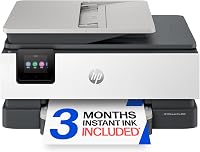
10 Best Ink Tank Printers (October 2026)
The best best ink tank printers include the Epson EcoTank ET-2803 for everyday home printing, the Canon MegaTank G3290 for double-sided schoolwork, and the Epson EcoTank ET-2980 for busy family desks.
On this page (6 sections)
- The best ink tank printers for home and home office
- How do you choose the best ink tank printer for your workload?
- How should you set up a new ink tank printer?
- How do you care for an ink tank printer without wasting ink?
- Which buying and printing mistakes should you avoid?
- Which ink tank printer should you choose?
The Epson EcoTank ET-2803 is the best ink tank printer for most homes that mainly print short, single-sided jobs. Choose the Canon MegaTank G3290 for frequent two-sided documents, or the Epson EcoTank ET-4800 for scanning stacks of paperwork.
Refillable tanks help when you print regularly, but paper handling determines how much work each job takes. A large ink supply won't turn sheets, load originals or make a slow color job finish sooner.
Our complete guide to ink tank printers explains the system. If your printer sits idle between occasional forms, start with whether ink tank printers are worth it.
Our picks at a glance
-
1
-
2

-
3

The best ink tank printers for home and home office
The ET-2803 leads for basic home use, while the other picks solve needs such as automatic duplex, batch scanning and wired networking. ClipboardClub compared the supported functions, stated speeds, connections and ink supplies to match each model to a household routine.
The comparison below puts paper handling first. Use it to remove models that lack a feature you'll need every week.
| Product | Best for | Functions | Duplex | Connectivity | Our score |
|---|---|---|---|---|---|
| Epson EcoTank ET-2803 | everyday home printing | Print, scan, copy | Single-sided | Wireless, USB | 8.7 |
| Canon MegaTank G3290 | double-sided schoolwork | Print, copy, scan | Automatic | Wireless, USB | 8.6 |
| Epson EcoTank ET-2980 | busy family desks | Print, scan, copy | Automatic | Wireless, USB | 8.5 |
| Epson EcoTank ET-2800 | short household jobs | Print, scan, copy | Single-sided | Wireless, USB | 8.4 |
| Canon MegaTank G3270 | single-sided homework | Print, copy, scan | Single-sided | Wireless, USB | 8.3 |
| Epson EcoTank ET-4800 | paperwork-heavy home offices | Print, scan, copy, fax | Manual | Wireless, Ethernet, USB | 8.1 |
| Canon PIXMA G6020 MegaTank | wired home offices | Print, copy, scan | Automatic | Wireless, Ethernet, USB | 8.0 |
| HP Smart Tank 5003 | refill-conscious households | Print, copy, scan | Manual | Wireless, USB | 7.6 |
| HP Smart Tank 6003 | color-heavy family paperwork | Print, copy, scan | Automatic | Wireless, USB | 7.3 |
| HP Smart Tank 6001 | Apple device households | Print, scan, copy | Automatic | Wireless, USB | 7.2 |
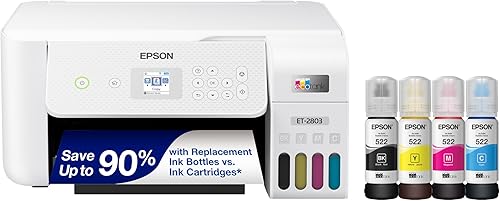
Epson EcoTank ET-2803
- Refillable ink tanks
- Flatbed scanner and copier
- AirPrint and Epson Smart Panel
- Color display
A home all-in-one for homework, forms and occasional copies. Choose it when most jobs are short and single-sided.
Pros
- AirPrint and Epson Smart Panel support
- Flatbed for documents and photos
- Refillable tanks replace cartridges
Cons
- No automatic two-sided printing
- Long color jobs require patience
Choose the ET-2803 for homework sheets, return labels, household forms and occasional copies. Its AirPrint and Epson Smart Panel support make it a useful shared printer for jobs sent from different devices.
The flatbed suits a single document or photo, and the color display gives you controls at the printer. It makes sense for a family that needs several functions but usually prints only a few pages at once.
Epson rates a replacement ink set for up to 4,500 black and 7,500 color pages. Those are page-yield claims, not a promise that every mix of photos and documents will reach the same total.
Skip it if long, two-sided packets are routine. Its single-sided printing and stated speeds of 10 ppm in black and 5 ppm in color suit short jobs better than a queue of lengthy color documents.
Canon MegaTank G3290
- Automatic two-sided printing
- 2.7 in color touchscreen
- Wireless print, copy and scan
- Borderless photos up to 8.5 x 11 in
A strong fit for families printing study packs and longer documents. The touchscreen also suits shared use without a phone for every task.
Pros
- Automatic two-sided printing
- Color touchscreen controls
- Supports documents and borderless photos
Cons
- 100-sheet plain paper capacity
- Color print speed is 6 ppm
Choose the G3290 when school packets, reports and reading material regularly need both sides of the sheet. Automatic duplex removes the need to reload the stack halfway through each job.
Its 2.7 in color touchscreen also suits a shared household where people want to copy or change settings at the printer. The 100-sheet plain paper capacity is enough for modest batches, though longer runs still need attention.
Canon rates one ink set for up to 6,000 black and 7,700 color pages. The hybrid ink system uses pigment black and dye-based colors, and it supports borderless photos up to 8.5 x 11 in.
This is a useful document-and-photo choice, but skip it if batch scanning is your main reason for upgrading. The ET-4800's document feeder addresses that task, while the G3290's clearest advantage is easier two-sided output.
Epson EcoTank ET-2980
- Automatic two-sided printing
- 15 ppm black and 8 ppm color
- Epson Smart Panel support
- Keyed EcoFit bottles
A useful step up for households with frequent document jobs. Automatic duplex and faster stated speeds suit a shared family printer.
Pros
- Automatic two-sided printing
- Mobile printing and scanning
- Keyed bottles help prevent color mix-ups
Cons
- 100-sheet maximum capacity
- Included ink is not an unlimited supply
The ET-2980 is the Epson choice here for a busy family desk. Its stated speeds of 15 ppm in black and 8 ppm in color give it more headroom for longer jobs than the basic ET-2800 and ET-2803.
Automatic duplex helps with study notes and work documents, while Epson Smart Panel supports printing and scanning from mobile devices. The 100-sheet maximum capacity still makes it a printer you'll refill during larger batches.
Epson rates the included ink for up to 6,600 black and 5,500 color pages, with an up-to-3-years claim. Compare those page allowances with your workload instead of assuming the ink will last 3 calendar years.
Choose it when document speed and duplex both matter. Skip the upgrade if your usual task is a single form, and don't choose it just because its years-of-ink headline is longer than another model's.
Epson EcoTank ET-2800
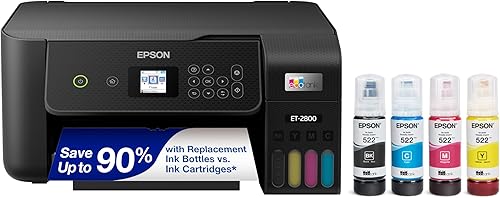
- Refillable ink tanks
- Flatbed scanning and copying
- Wi-Fi and USB
- LCD controls
A basic tank model for forms, homework pages and occasional scans. It fits a household that has little need for automatic duplex.
Pros
- Wireless printing from household devices
- Flatbed for individual originals
- Refillable tank system
Cons
- No automatic two-sided printing
- Color print speed is 5 ppm
The ET-2800 suits a household that needs basic printing plus occasional scans. A flatbed lets you place an individual original on the glass, which is useful for photos and documents that need careful positioning.
Wi-Fi supports shared home use, while USB gives you a direct computer connection. Its single-sided printing is a reasonable fit for short forms and homework pages that don't need a reverse side.
Epson rates an ink bottle set for up to 4,500 black and 7,500 color pages. That matches the stated yield for the ET-2803, so ink capacity alone doesn't give you a reason to prefer one.
Choose between these basic models by the device features you need. Skip the ET-2800 if two-sided packets or frequent stacks of originals are part of your routine, because neither tank capacity nor wireless printing removes that paper handling.
Canon MegaTank G3270
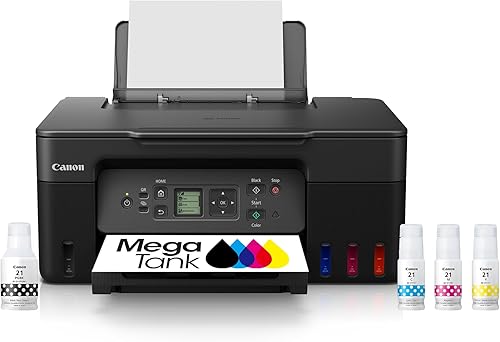
- Wireless print, copy and scan
- 1.35 in square LCD
- Up to 2 years of ink included
- Single-sided printing
A Canon option for routine pages and mobile printing without automatic duplex. Choose it when a small display and manual paper handling suit your routine.
Pros
- Wireless all-in-one functions
- Supports compatible phones and tablets
- Ink bottles included
Cons
- No automatic duplex
- Small display for onboard controls
The G3270 fits buyers who want Canon's refillable system for mostly single-sided pages. Wireless printing, copying and scanning cover everyday household needs without making automatic duplex part of the package.
Canon rates one ink set for up to 6,000 black and 7,700 color pages. Its stated speeds are 11 ppm in black and 6 ppm in color, which suit ordinary documents better than urgent, large color runs.
The 1.35 in square LCD is small, so think about how often you'll use onboard controls. A buyer who prefers larger, touch-based menus has a clearer reason to choose the G3290.
Pick the G3270 for worksheets, recipes and short documents where the second side is rarely needed. Skip it if you'd regularly reload paper to print the reverse, since that repeated step can matter more than a generous ink allowance.
Epson EcoTank ET-4800

- Automatic document feeder
- Fax capability
- Flatbed scanner and copier
- Ethernet and USB
The document feeder makes this the pick for stacks of loose originals. Fax and Ethernet add useful home office options.
Pros
- Automatic document feeder
- Fax capability
- Wired network connection
Cons
- Two-sided printing requires manual handling
- Color print speed is 5 ppm
The ET-4800 is the pick for a home office that receives stacks of loose paperwork. Its automatic document feeder reduces the need to lift the scanner lid and position every sheet by hand.
Fax adds another office function, while Ethernet gives you a wired network option. The flatbed remains useful for originals that shouldn't go through a feeder, such as photos or fragile documents.
The compromise is manual duplex printing. A feeder handles originals for scanning or copying; it doesn't turn printed pages over or establish that both sides of an original can be scanned automatically.
Choose this model when handling incoming documents takes more time than printing outgoing ones. Skip it if your main goal is unattended two-sided printing, and read our ET-4800 review for a closer look at its office role.
Canon PIXMA G6020 MegaTank
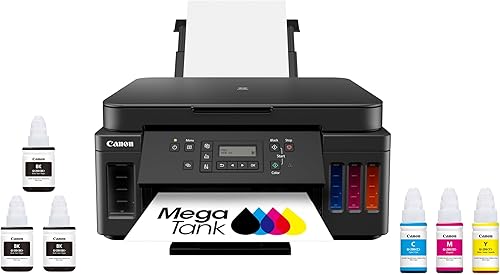
- Automatic two-sided printing
- Ethernet, USB and wireless
- Two-line LCD
- Two bonus black ink bottles included
Choose the G6020 for a fixed office desk with a wired network connection. It also handles automatic two-sided documents.
Pros
- Automatic two-sided printing
- Ethernet connection
- Extra black ink bottles included
Cons
- Basic two-line display
- 17.8 lb weight makes frequent moves less appealing
The G6020 fits a fixed home office where Ethernet and automatic duplex are both useful. Ethernet connects it to the local network by cable, while USB and wireless offer other ways to connect.
Canon rates one ink set for up to 6,000 black and 7,700 color pages. The box also includes 2 bonus black ink bottles, which makes the included supplies worth checking when comparing document-focused options.
Its two-line LCD favors basic controls over a larger visual interface. At 17.8 lb, it also makes more sense on a permanent printer shelf than somewhere you must clear after each use.
Choose it for a desk-based document workflow, especially with a nearby network port. Skip it if a color touchscreen is a priority, and use our Epson EcoTank and Canon MegaTank comparison to weigh the wider ranges.
HP Smart Tank 5003
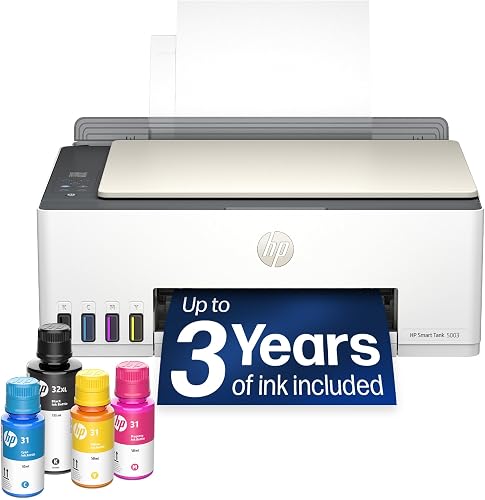
- Bottles drain without squeezing
- Print, copy and scan
- Wireless and mobile printing
- Borderless printing
An HP option for everyday color pages and buyers who want bottle refills without squeezing. Two-sided jobs need manual paper handling.
Pros
- Bottle system designed for simple refills
- Wireless all-in-one functions
- Borderless printing support
Cons
- No automatic duplex
- Color print speed is 5 ppm
The Smart Tank 5003 suits a household that wants everyday wireless printing with a refill system designed to avoid squeezing bottles. HP describes the system as mess-free, with bottles that drain into the tanks.
It prints, copies and scans, and supports borderless output. That covers mixed household jobs such as forms, color projects and occasional photos without making this a dedicated photo printer.
HP rates the included supply for up to 6,000 black or color pages and describes it as up to 3 years of ink. The time claim depends on how much you print, so use the page allowance when planning supplies.
Choose it for short jobs where manual two-sided printing is manageable. Skip it for frequent duplex documents, and don't choose it solely for the bottle design because the HP 6001 and 6003 also offer refills without squeezing.
HP Smart Tank 6003

- Automatic two-sided printing
- Up to 3 years of ink included
- Wireless and mobile printing
- Borderless printing
A family option for two-sided documents and frequent color pages. Compare its included page allowance with your workload before relying on the years-of-ink claim.
Pros
- Automatic two-sided printing
- Wireless printing from phones and computers
- Bottle refills without squeezing
Cons
- 14.1 lb weight
- Desk clearance needed beyond the closed body
The Smart Tank 6003 is the HP option here for families that want automatic duplex and a substantial included color allowance. HP rates the supplied ink for up to 6,000 black or 8,000 color pages.
Wireless and mobile printing suit a shared printer used by phones and computers. Borderless printing adds flexibility for photo projects, though paper choice and print settings still shape the finished result.
HP describes the included supply as up to 3 years of ink. That wording doesn't make it a larger page allowance than the 6001, which has the same stated black and color totals.
Choose the 6003 for frequent two-sided documents and color pages. Skip it if the years-of-ink headline is your only reason to prefer it, and allow extra space around its 16.83 in wide body for paper, cables and access.
HP Smart Tank 6001

- Automatic two-sided printing
- HP Smart app and Apple AirPrint
- LCD and touch controls
- Borderless printing
A fit for households that want AirPrint, HP Smart and automatic duplex together. Its stated page allowance matches the 6003 despite a different years-of-ink claim.
Pros
- Automatic two-sided printing
- AirPrint support
- Mobile printing through HP Smart
Cons
- 14.1 lb weight
- Color print speed is 7 ppm
The Smart Tank 6001 suits households that want Apple AirPrint and HP Smart alongside automatic duplex. It also has an LCD and touch controls for tasks at the printer.
HP rates the included ink for up to 6,000 black or 8,000 color pages, described as up to 2 years of printing. Compare those page totals directly with the 6003 instead of treating the different time claims as different ink capacities.
Stated speeds are 12 ppm in black and 7 ppm in color. Short household jobs suit that pace better than a large queue of color-heavy documents.
Choose it when those mobile printing options match the devices you use daily. Skip it if you need a document feeder for incoming paperwork, and check the full open-tray footprint before placing it inside a desk cubby.
How do you choose the best ink tank printer for your workload?
Choose paper handling first, then connections and ink supply. A model that removes a repeated task will usually serve you better than one chosen only for its largest page-yield claim.
Which ink tank printer features save you time?
Automatic duplex matters when you regularly print both sides of reports, lesson packs or reading material. It turns the sheet for you, though it doesn't mean two-sided jobs run at the same pace as single-sided ones.
A document feeder solves a separate problem: loading a stack of originals for scanning or copying. For weekly paperwork, decide which stack takes more effort, the pages going into the scanner or the pages coming out of the printer.
Flatbeds remain useful for books, photos and delicate originals. If you need automatic scanning of both sides, confirm that exact function rather than assuming any feeder provides it.
How much do you actually print?
Estimate a normal month's pages, including seasonal peaks such as school projects or tax paperwork. Separate short black-text jobs from color-heavy pages because they use ink differently.
Tank printers suit regular use, but a large supply offers little benefit if you barely print. For a machine left idle for long stretches, consider maintenance habits and alternatives before focusing on bottle yield.
How should you read ink-yield claims?
Use page totals as planning estimates, and keep included ink separate from replacement-set yield. Some ink is used during initial preparation, and the amount used per page changes with coverage and print settings.
A page of short text is different from a full-page color graphic or photo. Black and color allowances also aren't separate guaranteed totals you can simply add together.
Years-of-ink claims depend on assumed printing volume. Compare the pages and your workload first; a longer time claim alone doesn't show that the box contains more usable ink.
Which connections should you prioritize?
Choose AirPrint support when you want to print from compatible Apple devices without relying on a separate app for every job. For other devices, check that the printer's software supports your operating system and the functions you need.
USB suits a nearby computer. Ethernet suits a fixed shared printer near a network connection, though phone and computer access still depend on correct local network settings.
Place a wireless printer where it gets a reliable signal. A distant shelf chosen only to hide the machine can turn a convenient setup into repeated connection trouble.
What matters for photos and desk space?
For photos, check paper types, borderless sizes and feed limits before ink capacity. A setting for plain paper won't give photo paper the same result as the correct media setting.
Measure the working space with paper trays open and room to lift the scanner lid. Closed-body dimensions don't account for every movement needed to load paper, refill ink or clear a jam.
Keep the printer on a stable surface where you can see the tank levels. A tight cabinet may make routine care awkward even if the printer body fits.
How should you set up a new ink tank printer?
Follow the model's setup order and finish ink preparation before sending normal jobs. Skipping a step can leave you chasing print or connection problems that began during installation.
- Choose the permanent location first. Leave room for trays, the scanner lid, cables and refill access.
- Remove packing materials. Check the paper path and follow the guide for any transport pieces.
- Match each bottle to its tank. Check both the color and bottle code, and never force a bottle that doesn't fit.
- Complete ink charging. Leave the printer connected to power until the setup process finishes.
- Run the prompted alignment and quality checks. Load the paper requested by the setup guide.
- Connect your main devices. Print a short document from the computer and phone you'll actually use.
Save the setup guide and record the correct bottle codes somewhere easy to find. Similar model names don't mean every bottle in a brand's range is interchangeable.
Set your usual paper size and default print preferences after installation. For two-sided work, check page orientation and binding edge so the reverse side reads in the right direction.
How do you care for an ink tank printer without wasting ink?
Use the printer regularly, keep the paper path clean and check nozzles before running cleaning cycles. Tank inkjets still need care even when plenty of ink remains in the reservoirs.
Print a small document with black and color from time to time during quiet periods, following the model's maintenance advice. Our guide to EcoTank ink and infrequent printing explains why long idle periods deserve attention.
If colors disappear or lines break up, start with the printer's nozzle-check function. Follow the prescribed cleaning sequence and waiting periods instead of repeatedly choosing the strongest cleaning option.
Cleaning uses ink, so more cycles aren't always better. The guide to cleaning an Epson EcoTank print head walks through that process for Epson users.
Check tank levels before long runs and follow the refill marks in the manual. Keep bottle caps clean, protect the desk beneath the refill area and stop at the proper level.
For more on Epson's system, see our Epson EcoTank overview and guide to refilling an Epson EcoTank. Choose ink by exact compatibility rather than color name alone.
Use the power button for normal shutdown and let the printer finish its shutdown routine. Avoid cutting power mid-job or moving a filled printer without following its transport instructions.
Which buying and printing mistakes should you avoid?
Avoid choosing by ink supply alone and assuming every all-in-one handles paper the same way. The most costly mismatch can be the small task you repeat every day.
Don't read “all-in-one” as a promise of automatic duplex, a document feeder or fax. Check those functions separately against the work you expect the printer to handle.
Don't use maximum resolution as a complete measure of print quality. Paper, media settings, file quality and the type of document all affect the result.
Don't reload a whole stack for manual duplex before checking orientation with a small job. A simple mark on a practice sheet can help you learn which side and edge feed first.
Don't choose draft mode for final photos or high-quality mode for every rough document. Match quality to the job, preview page ranges and remove blank pages before printing.
Don't assume refillable means maintenance-free or that a bottle can be poured into any tank. Correct ink, sensible storage and the model's care instructions matter throughout ownership.
Which ink tank printer should you choose?
Choose the ET-2803 when short home jobs dominate, the G3290 when two-sided packets are routine, or the ET-4800 when stacks of originals need scanning. The G6020 is the clearest fit here for automatic duplex alongside Ethernet.
For a busy family desk, consider the ET-2980's higher stated speeds. In the HP range, choose the 6001 for its named AirPrint support or compare the 6003 by page allowance rather than its longer time claim.
The best ink tank printer is the one that removes the paper handling you do most often and fits your regular print volume. If you're still deciding on the system itself, our ink tank versus cartridge inkjet comparison is the useful next step.
Our top 3 picks at a glance
-
1
-
2
-
3
Frequently asked questions
What is the best ink tank printer for most homes?
The Epson EcoTank ET-2803 is our top pick for homes that mostly print short, single-sided jobs. It combines wireless printing with scanning and copying.
Choose the Canon MegaTank G3290 for frequent two-sided documents, or the Epson EcoTank ET-4800 when scanning stacks of originals is a regular task.
Are ink tank printers good for photos?
Ink tank printers can suit family photos, but paper support and borderless sizes matter more than tank capacity. The Canon MegaTank G3290 supports borderless photos up to 8.5 x 11 in.
Match the paper setting to the paper you load, and judge color on the finished print after it dries.
Do ink tank printers print on both sides automatically?
Some do, but refillable tanks do not imply automatic duplex. The Canon G3290 and G6020, Epson ET-2980, and HP 6001 and 6003 turn sheets automatically.
The other picks require manual handling for two-sided output.
Automatic duplex printing also does not mean a printer can scan both sides of an original automatically.
How do I choose between Epson EcoTank, Canon MegaTank and HP Smart Tank?
Choose the model by its paper handling and connections before choosing a brand. Decide whether you need automatic duplex, a document feeder or Ethernet, then compare bottle compatibility and page allowances.
Our Epson EcoTank vs Canon MegaTank comparison explains how to approach those two ranges without treating every model as interchangeable.