Epson EcoTank vs HP Smart Tank: Which Should You Buy? (October 2026)
For Epson EcoTank vs HP Smart Tank, choose the ET-2803 for everyday single-sided home printing with AirPrint, the 5003 for borderless projects without automatic duplex, or the 6001 for frequent two-sided documents. Compare the exact models rather than choosing by the brand's included-ink estimate.
On this page (9 sections)
- Epson EcoTank vs HP Smart Tank: what should decide your choice?
- Does more included ink mean a better deal?
- How much does automatic duplex matter?
- Which model suits each type of household?
- Will print speed or scanning change the decision?
- What should you prepare before setup?
- How do you refill and care for either tank system?
- Which buying and printing mistakes should you avoid?
- Epson EcoTank vs HP Smart Tank: which is right for you?
For Epson EcoTank vs HP Smart Tank, choose the ET-2803 for everyday single-sided paperwork, the Smart Tank 5003 for occasional borderless projects, or the 6001 for frequent two-sided documents. Your weekly printing routine matters more than the number of years printed on the ink claim.
All three are refillable color inkjet printers that print, copy and scan. This comparison covers these exact models, since features differ across both brands' ranges.
Epson EcoTank vs HP Smart Tank: what should decide your choice?
Start with how you handle paper, then compare ink supplies and device support. A printer that turns pages automatically can be more useful than a longer included-ink estimate if you print assignments or reports every week.
Write down your 3 most common jobs before choosing. A household printing permission slips, color worksheets and occasional receipts needs different features from one producing long documents on both sides.
Which Epson EcoTank or HP Smart Tank fits your weekly jobs?
The ET-2803 fits routine home paperwork, the 5003 adds borderless output, and the 6001 handles two-sided documents automatically. Those differences give each model a clear role without making either brand the winner for everyone.
Think about the inconvenience you want to remove. For some homes, it's changing cartridges; for others, it's standing beside the printer to reload pages halfway through a document.
For the basics of tanks and refills, see our guide to ink tank printers. Our ink tank printer versus inkjet comparison explains the practical differences between refillable tanks and cartridge models.
Does more included ink mean a better deal?
Included ink helps with initial use, but year claims don't measure running cost by themselves. Compare page estimates, the type of ink supply being described and how much you actually print.
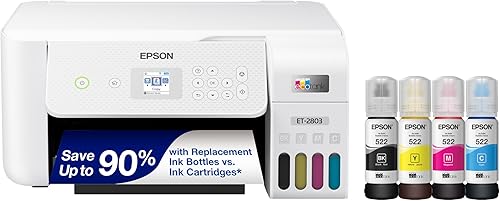
Epson describes the ET-2803's included ink as lasting up to 2 years at roughly 125 pages per month. Its replacement ink set has separate estimates of up to 4,500 black pages and 7,500 color pages.
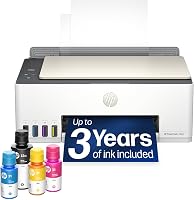
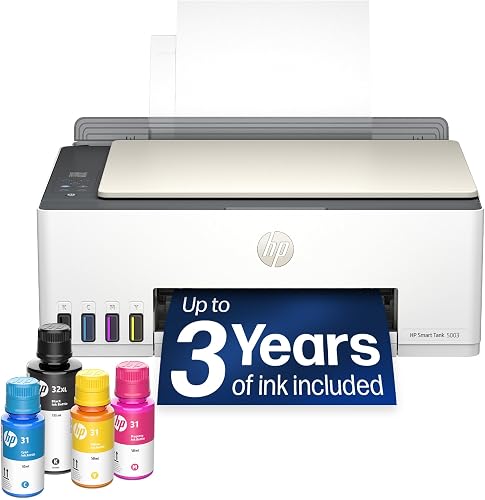
HP describes the 5003's included supply as up to 3 years, with up to 6,000 black or color pages. The 6001 includes up to 2 years of ink, with estimates of up to 6,000 black or 8,000 color pages.
These figures don't all describe the same thing. Epson's replacement-set figures concern later refills, while HP's figures above concern the ink supplied with the printers.
Don't add black and color estimates together as a promised total. Your mix of dense graphics, short letters, photos and maintenance tasks affects how quickly the tanks empty.
To judge long-term value, consider compatible refill bottles and your likely paper use alongside ink. A large supply offers less benefit if the printer sits idle for months; our guide to whether ink tank printers are worth it helps with that decision.
How much does automatic duplex matter?
Automatic duplex matters most for frequent multi-page documents, because it removes the need to reload sheets between sides. Among these models, the HP Smart Tank 6001 provides it.
The Smart Tank 5003 supports manual duplex through its driver. The ET-2803 is simplex, so it prints one side at a time.
Manual paper handling is manageable for an occasional form. It becomes a repeated chore when several family members need double-sided assignments, reading packets or reports.
Before a long manual two-sided job, use a short sample document to learn the reload direction. A small pencil mark on a spare sheet can help you see which face and edge the printer uses.
Automatic duplex doesn't mean automatic two-sided scanning. If you need to copy stacks of originals, check the separate scanning workflow rather than assuming a printing feature covers it.
Our guide to duplex printing and other ink tank features explains how duplex output and an automatic document feeder solve different problems.
Which model suits each type of household?
Choose the model that handles your routine with the fewest extra steps. The following buyer profiles matter more than a feature you might use once a year.
Epson EcoTank ET-2803: everyday forms and worksheets
The ET-2803 suits a home that prints school sheets, forms and color documents, then occasionally scans an original. Its flatbed scanner works for placing individual items on the glass, and its color display gives you local controls.
AirPrint and Epson Smart Panel support make it worth considering when household members send jobs from different devices. It also supports voice-activated printing, though that shouldn't outweigh basic paper handling in your decision.
Skip it if two-sided output is central to your routine. Its replacement-set yield estimates help you plan refills, but they don't remove the work of handling paper for the second side.
HP Smart Tank 5003: documents and occasional borderless projects
The 5003 suits a household mixing ordinary paperwork with borderless prints. Borderless output is useful when you want an image to reach the paper edges, provided the paper and chosen print size support that mode.
Its wireless and mobile printing cover everyday ways of sending documents. The refill bottles drain without squeezing, and manual duplex gives you a guided way to complete two-sided jobs through the driver.
Skip it if you print long two-sided documents often or need quicker color output. Its included-ink period shouldn't be the deciding feature when another model would save paper-handling time every week.
HP Smart Tank 6001: regular assignments and longer documents
The 6001 suits families that regularly print homework packets, reports and other longer documents. Automatic duplex is its strongest reason to buy, with borderless printing available for a different kind of project.
It also offers an LCD, touch control, HP Smart app support and Apple AirPrint. Those options are useful when several people share the printer and don't all send jobs the same way.
Skip it if nearly everything you print is a single page and you don't need its faster output. Choose the extra workflow features because you'll use them, rather than assuming a larger model is always the better fit.
Will print speed or scanning change the decision?
Speed favors the 6001; occasional copying doesn't create such a clear winner. All three cover basic print, copy and scan tasks, so focus on where delays occur in your routine.
The ET-2803 and 5003 each have stated speeds of 10 black and 5 color pages per minute. The 6001 reaches 12 black and 7 color pages per minute.
Those differences matter more across repeated multi-page jobs than on a single permission slip. Print quality settings, graphics and paper choice can also change how long a job takes.
For scanning, think about the originals you handle. Receipts, book pages and loose sheets each need suitable placement and settings; a print-speed figure tells you little about that work.
If your main need is digitizing large paper stacks, confirm the exact feeding and scanning features before choosing any of these printers. For occasional receipts and forms, device access and an easy save location are likely more useful priorities.
What should you prepare before setup?
Clear a permanent workspace and identify every device that will print before you fill the tanks. This helps you avoid moving a newly filled printer or discovering that only one family member can send jobs.
Allow room for the scanner lid, paper loading, output and cable access. A shelf that holds the printer's main body may still leave too little space to use it comfortably.
Follow the supplied setup sequence for your exact model, including any printhead or initial ink steps. Let the initial preparation finish before turning off the printer or starting a large print job.
For wireless setup, have your network details ready and follow the printer's connection prompts. Print a simple document from each device you plan to use, then check where scanned files are saved.
Choose a clear printer name if your computer still remembers an older machine. This reduces the chance of sending documents to an inactive print queue.
Our HP Smart Tank setup guide walks through that brand's setup process. Keep the supplied instructions nearby so you can follow the steps for your specific model.
How do you refill and care for either tank system?
Use the correct bottles and refill carefully, even when the filling system is designed to reduce mess. Epson uses EcoFit bottles, while HP describes bottles that plug into the tanks and drain without squeezing.
The ET-2803 uses Epson 522 ink. These HP models use HP 32XL black and HP 31 color bottles, so brand name alone isn't enough to identify the right refill.
Match each color to its tank before opening the bottle. Work on a level surface, protect the area underneath and stop at the point directed in the printer's instructions.
Don't force bottles into place or squeeze a bottle designed to drain on its own. Close the tank caps securely and store leftover ink according to the bottle instructions.
For Epson bottle compatibility, our Epson 502 and 522 ink guide explains the difference. Never assume a similar bottle number means the inks can be swapped.
What if you print only occasionally?
Long idle periods deserve attention with either inkjet tank system. Keep the printer in a suitable indoor location and follow its normal power-off procedure so it can finish any shutdown steps.
An occasional small document using black and color can help you notice a missing color before an important job. It doesn't guarantee that ink will never dry or that a nozzle will never clog.
Our guide to whether EcoTank ink dries out during infrequent use explains the idle-use tradeoff. If printing is rare and mostly black text, reconsider whether a tank printer matches your habits.
What should you do about streaks or missing colors?
Start with the printer's diagnostic or nozzle-check process, then follow the recommended maintenance sequence. Check ink levels and print settings before repeatedly running cleaning cycles.
Repeated cleaning uses ink, so pause and follow the manual if the first steps don't resolve the problem. Our EcoTank print-head cleaning guide covers the Epson process in more detail.
Which buying and printing mistakes should you avoid?
Don't choose by ink years alone or assume every family member will use the same workflow. A useful printer must fit your paper, devices and willingness to handle routine upkeep.
Avoid buying solely for occasional photo projects if most of your work is two-sided paperwork. Choose the feature that serves the larger share of your jobs.
Check paper compatibility before feeding thick craft stock, labels or specialty photo paper. Use the matching paper setting, since plain-paper settings aren't a substitute for the correct media choice.
Use print preview for web pages and emails, and select only the pages you need. This avoids unwanted headers, blank pages and extra sheets before ink or duplex features enter the picture.
Don't mistake borderless capability for proof of superior photo quality. Paper choice, image quality and print settings all affect the result, and this comparison doesn't guarantee a photo-quality winner.
For closer model research, read our HP Smart Tank 5003 review. The Epson EcoTank ET-2800 review helps if you're also considering that separate Epson model.
Epson EcoTank vs HP Smart Tank: which is right for you?
Choose the ET-2803 for routine single-sided home printing, the 5003 for documents plus occasional borderless projects, or the 6001 when frequent two-sided jobs justify automatic duplex. Put your most common document ahead of the included-ink calendar claim.
Before ordering, picture a normal week's work: who sends it, how many sheets need both sides and where scans must go. That gives your Epson EcoTank vs HP Smart Tank decision a practical basis.
If neither brand's options fit, our Epson EcoTank vs Canon MegaTank comparison gives you another tank-printer route to consider.
Frequently asked questions
Is Epson EcoTank better than HP Smart Tank?
Neither brand wins for every home: the ET-2803 fits everyday single-sided paperwork with AirPrint, the Smart Tank 5003 adds borderless output with manual duplex, and the 6001 suits frequent two-sided jobs. Choose among these models by your weekly tasks, rather than assuming every printer in either range has the same features.
Which printer includes more ink, Epson EcoTank or HP Smart Tank?
HP gives the 6001 the highest included color-page estimate here: up to 8,000 color pages or 6,000 black pages. The 5003 includes up to 6,000 black or color pages, while Epson describes the ET-2803's included supply as up to 2 years at roughly 125 pages per month.
Which is faster, the Epson ET-2803 or HP Smart Tank?
The HP Smart Tank 6001 has the highest stated speeds: 12 black and 7 color pages per minute. The ET-2803 and Smart Tank 5003 each reach 10 black and 5 color pages per minute, so speed doesn't separate those two; document layout, print settings and paper choice also affect job time.
Do Epson EcoTank and HP Smart Tank printers print double-sided?
The HP Smart Tank 6001 prints both sides automatically, while the 5003 offers manual duplex with driver support; the Epson ET-2803 prints one side at a time, so completing a two-sided document means handling the paper yourself. Automatic duplex printing concerns output; it doesn't tell you whether a printer scans both sides automatically.
Which printer is easiest to refill?
Both brands provide bottle systems designed to reduce spills, so refill design alone doesn't guarantee a clear winner; Epson uses EcoFit bottles, while HP's bottles plug into the tanks and drain without squeezing. Use the correct ink, match each color carefully, and follow the model's fill instructions on a level surface.