HP Smart Tank 5003 Review: Worth It? (October 2026)
This HP Smart Tank review recommends the 5003 for regular household color printing when manual page turning is acceptable. Choose the 6001 if you want automatic two-sided printing.
On this page (8 sections)
- HP Smart Tank review: who should buy the 5003?
- How does the 5003 compare with the other tank printers?
- How should you judge the included ink supply?
- Will manual duplex become a daily nuisance?
- How should you set up the 5003?
- What care helps a refillable printer stay useful?
- Which buying mistakes should you avoid?
- HP Smart Tank review verdict: should you buy the 5003?
The HP Smart Tank 5003 is a good fit for regular household color printing, provided you can turn two-sided jobs manually. This HP Smart Tank review favors it for schoolwork, forms, recipes, and everyday copies rather than deadline-driven batches.
Its refillable tanks make sense when you print often enough to use the ink. Before choosing it, decide whether your bigger need is a generous starting supply or less work handling paper.
HP Smart Tank review: who should buy the 5003?
Buy the 5003 if you want one device for printing, copying, and scanning and mostly send short documents. Skip it if frequent two-sided packets would leave you standing beside the printer to reload paper.
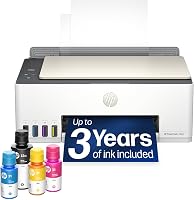
HP Smart Tank 5003
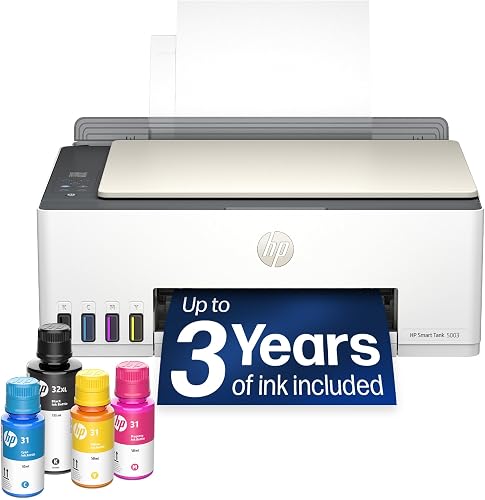
- Print, copy, scan
- Up to 6,000 black or color pages included
- Manual duplex support
A refillable home all-in-one for schoolwork, forms, and everyday color documents. Its main compromise is manual page turning for two-sided jobs.
Pros
- Prints, copies, and scans
- Wireless and mobile printing
- Refill bottles drain without squeezing
Cons
- Duplex printing is manual
- Long color documents take patience
Wireless and mobile printing suit a household where several people send documents from different devices. Borderless printing adds an option for color projects, though you should match the paper size and media type to the job.
The strongest fit is a family that prints throughout the week: a permission form today, homework tomorrow, and a few color pages at the weekend. That pattern makes the tank system useful without demanding office-style speed.
HP Smart Tank review: when should you skip the 5003?
Skip the 5003 when paper handling matters more than ink capacity. Repeated two-sided reports, long color documents, or frequent stacks of originals call for closer attention to workflow features.
Printing on both sides and scanning both sides are separate jobs. If you need to scan a pile of signed forms, confirm automatic document feeder and two-sided scanning support before choosing any model here.
For frequent two-sided printing, the HP Smart Tank 6001 comparison below is the key part of this review. Its automatic page turning addresses the 5003's clearest limitation.
How does the 5003 compare with the other tank printers?
The 6001 offers the most useful workflow upgrade, while the 5100 mainly improves black text speed. Epson's ET-2803 is the alternative for buyers who want its color display, flatbed scanner, and AirPrint support.
| Printer | Black / color speed | Duplex | Main reason to consider it |
|---|---|---|---|
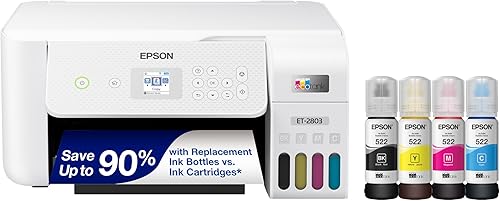
| Epson EcoTank ET-2803 | 10 / 5 pages per minute | Simplex | AirPrint and a color display |
| HP Smart Tank 5003 | 10 / 5 pages per minute | Manual, with driver support | Everyday household documents |
| HP Smart Tank 6001 | 12 / 7 pages per minute | Automatic | Frequent two-sided print jobs |
| HP Smart Tank 5100 | 12 / 5 pages per minute | Manual, with driver support | More black text output |
These speed figures help compare models, but they aren't a promise for every file. Dense graphics, paper settings, and print quality choices can all affect how long a job takes.
Epson EcoTank ET-2803: for Apple households and individual scans
Choose the ET-2803 if AirPrint and on-printer menus fit your routine. Its flatbed scanner suits individual sheets and originals that need to lie flat, while the color display gives you a way to use menus at the printer.
Skip it if automatic two-sided printing is your main reason to replace an older printer. Its simplex design doesn't solve that need, and it offers no speed increase over the 5003 in the figures above.
HP Smart Tank 6001: for repeated two-sided work
Choose the 6001 for reports, reading packets, and other regular two-sided jobs. Automatic duplex removes the need to turn and reload the stack between sides.
It also supports Apple AirPrint and has an LCD display with touch control. Skip the upgrade if your jobs are mostly short and single-sided, because those extras may change little about your day.
HP Smart Tank 5100: for households that favor black text
Choose the 5100 when most of your output is black text and you can accept manual page turning. Its speed advantage over the 5003 applies to black printing, not color output.
Skip it if you're trying to make color projects finish sooner or remove paper reloading. Neither need is addressed by its faster black print speed.
For broader brand differences, read our Epson EcoTank vs HP Smart Tank comparison. Our ink tank printer guide explains where refillable models fit among home printers.
How should you judge the included ink supply?
Judge the included ink by page yield and your likely use, rather than the number of years on the box. HP describes the 5003's supply as up to 3 years, with up to 6,000 black or color pages.
That wording doesn't mean every household gets the same lifespan. A page with a few lines of text uses ink differently from a page covered in color graphics.
Don't add the black and color figures together and assume a guaranteed total. Use the stated yields as comparison points, then consider the mix of documents you actually print.
The 6001 shows why the year claims need care: HP describes its included supply as up to 2 years, yet gives a higher maximum color yield of 8,000 pages. The calendar claim alone doesn't identify which supply suits you better.
Estimate your monthly use from a normal month, then account for school deadlines or other busy periods. A household that prints only a handful of pages may get little practical benefit from holding a large ink supply.
Our guide to whether ink tank printers are worth it helps you decide whether regular refills match your habits.
Will manual duplex become a daily nuisance?
Manual duplex is manageable for occasional short jobs, but it becomes a chore when you print two-sided documents often. The 5003's driver guides the process, while you handle the paper between sides.
Before a long job, print a short sample with clearly numbered pages. Check which way the stack goes back into the tray and whether the back is upright before sending the full document.
Keep the pages in order when the driver asks you to reload them. Flipping or rotating the stack the wrong way can produce upside-down backs or print over the same side.
Allow heavy color pages to dry before feeding them through again, following the paper and printer instructions. Choose suitable paper rather than assuming every sheet will handle ink well on both sides.
If several family members print from phones, also check how their chosen app handles two-sided jobs. Driver-supported manual duplex should not be assumed to work identically from every device.
Our guide to duplex printing and document feeders explains which paper-handling features save effort for different tasks.
How should you set up the 5003?
Set up the 5003 on a stable, level surface, and follow HP's guide in order. Leave time to fill the tanks, fit the supplied printheads as directed, and complete the startup process before sending normal work.
The printer measures 17.11 inches wide, 14.23 inches deep, and 6.19 inches high. Allow extra room to open it, load paper, collect output, and reach the refill area instead of choosing a shelf by the closed dimensions alone.
Match each ink bottle to the correct tank before opening it. HP's refill system lets the bottle drain without squeezing, so don't force ink in or improvise with funnels.
Keep the guide nearby for the printhead steps, and avoid touching exposed contacts or nozzles. Don't rush past prompts or interrupt the initial ink preparation process.
For wireless setup, keep your network details ready and follow the connection instructions for your device. USB is another connection option when a nearby computer makes a cable more practical.
Finish by printing a simple document and making a copy. Then check printing from each household device that will use it, so connection problems are caught before an urgent job.
Our HP Smart Tank setup guide walks through the process in more detail.
What care helps a refillable printer stay useful?
Use the printer regularly and follow its maintenance prompts instead of waiting for an urgent document to reveal a problem. Refillable tanks still need correct ink, clean paper, and sensible care.
Keep paper dry and flat, and adjust the guides so the stack sits straight without being squeezed. Curled or damp sheets can create feeding problems that an ink refill won't fix.
Check tank levels before a large job and refill according to HP's instructions. For the 5003, the compatible supplies are HP 32XL black and HP 31 cyan, magenta, and yellow.
Keep bottles capped and stored as directed, and don't mix ink types or colors. A bottle that looks similar is not enough reason to pour it into a tank.
If output develops gaps or missing colors, start with the printer's diagnostic procedure. Run cleaning only when indicated, since repeated cleaning uses ink and won't fix a paper setting or connection problem.
Use the printer's power button for normal shutdown and let it finish. Before moving a filled tank printer, follow its transport instructions and keep it upright.
Which buying mistakes should you avoid?
Avoid buying for one headline feature while overlooking the jobs you do every week. Ink capacity helps only when the rest of the printer fits your documents and devices.
- Confusing duplex printing with duplex scanning: Automatic two-sided output says nothing by itself about how originals are scanned.
- Assuming borderless means every paper size: Check the supported size and media settings for your intended project.
- Expecting office-style batch speed: A refillable supply doesn't make a home printer fast at long color documents.
- Buying for rare use alone: If printing is infrequent and mostly black text, compare an ink tank printer with a laser printer before deciding.
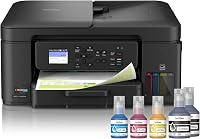
- Treating all tank systems as identical: Read what Brother INKvestment Tank means if you're comparing it with refillable bottle systems.
Also check the space around the printer, not just the desk width. A model that fits tightly under a shelf may still be awkward to refill or use for copies.
HP Smart Tank review verdict: should you buy the 5003?
Choose the 5003 for regular family documents when short jobs and occasional manual duplex fit your routine. Choose the 6001 when frequent two-sided work makes automatic page turning worth more than a longer advertised ink lifespan.
Pick the 5100 for its higher black text speed, or the ET-2803 when AirPrint and a color display better match how your household prints. Neither is a substitute for automatic duplex if that's the feature you need.
The decision from this HP Smart Tank review is simple: count the paper-handling steps you'll repeat each week before comparing ink-year claims. For a wider shortlist, use our best ink tank printers guide.
Frequently asked questions
Is the HP Smart Tank 5003 a good printer?
The HP Smart Tank 5003 is a good fit for regular household documents, schoolwork, and occasional color projects; it combines refillable tanks with printing, copying, and scanning. Choose a different model if your routine depends on automatic two-sided output or fast batches of color pages.
Does the HP Smart Tank 5003 print on both sides automatically?
No, the HP Smart Tank 5003 uses manual duplex printing with driver support; you print one side, turn and reload the paper as directed, then print the other side. The HP Smart Tank 6001 adds automatic duplex, making it the better choice for frequent two-sided documents.
How much ink comes with the HP Smart Tank 5003?
The HP Smart Tank 5003 includes an HP 32XL black bottle and HP 31 bottles in cyan, magenta, and yellow; HP describes the supply as up to 3 years of ink, with up to 6,000 black or color pages. Actual use depends on page coverage and your printing routine.
What is the difference between the HP Smart Tank 5003 and 6001?
The HP Smart Tank 6001 adds automatic duplex, an LCD display, and faster black and color printing; the 5003 requires manual page turning for two-sided jobs. Choose between them by how you handle documents, rather than assuming that the larger advertised number of ink years identifies the better printer.